Input
Reading input
This chapter builds a paddle you can move with W and S. Space serves a ball once per press, and a mouse click moves the paddle to the cursor's row.
Ebitengine provides input polling. ebiten.IsKeyPressed(ebiten.KeyW)
answers whether W is held on this tick. A serve needs a different answer: whether
Space went down on this tick. The program reads those answers once at the top of
Update and passes plain booleans to the game rules.
Moving the paddle
// cmd/paddle/main.go — create
package main

import (
	"image/color"
	"log"

	"github.com/hajimehoshi/ebiten/v2"
	"github.com/hajimehoshi/ebiten/v2/vector"
)

const (
	screenW = 320
	screenH = 180
	border  = 2 // the court's border, which nothing crosses
)

var (
	courtColor = color.RGBA{R: 16, G: 20, B: 28, A: 255}
	lineColor  = color.RGBA{R: 232, G: 232, B: 232, A: 255}
	dimColor   = color.RGBA{R: 60, G: 66, B: 80, A: 255}
)

// drawCourt paints the court: the fill, a border two pixels wide just
// inside the edge, and a net of dashes down the middle.
func drawCourt(screen *ebiten.Image) {
	screen.Fill(courtColor)
	vector.StrokeRect(screen, 1, 1, screenW-2, screenH-2, 2, lineColor, false)
	for y := 0; y < screenH; y += 8 {
		vector.FillRect(screen, 159, float32(y), 2, 4, lineColor, false)
	}
}

// The paddle is four pixels wide and twenty-four tall, on column 8, and
// moves two pixels a tick.
const (
	paddleX     = 8
	paddleW     = 4
	paddleH     = 24
	paddleSpeed = 2
)

// keys is what the player is doing this tick: the keys held.
type keys struct {
	up, down bool // W and S, while held
}

// readKeys asks Ebitengine about the keyboard, once a tick.
func readKeys() keys {
	var k keys
	k.up = ebiten.IsKeyPressed(ebiten.KeyW)
	k.down = ebiten.IsKeyPressed(ebiten.KeyS)
	return k
}

type Game struct {
	paddleY float64 // the paddle's top edge
}

// clamp returns v held inside [lo, hi].
func clamp(v, lo, hi float64) float64 {
	if v < lo {
		return lo
	}
	if v > hi {
		return hi
	}
	return v
}

// step advances the game one tick with what the player is doing.
func (g *Game) step(k keys) {
	if k.up {
		g.paddleY -= paddleSpeed
	}
	if k.down {
		g.paddleY += paddleSpeed
	}
	g.paddleY = clamp(g.paddleY, border, screenH-border-paddleH)
}

func (g *Game) Update() error {
	g.step(readKeys())
	return nil
}

func (g *Game) drawPaddle(screen *ebiten.Image) {
	vector.FillRect(screen, paddleX, float32(g.paddleY), paddleW, paddleH, lineColor, false)
}

func (g *Game) Draw(screen *ebiten.Image) {
	drawCourt(screen)
	g.drawPaddle(screen)
}

func (g *Game) Layout(outsideWidth, outsideHeight int) (int, int) {
	return screenW, screenH
}

func main() {
	ebiten.SetWindowSize(960, 540)
	ebiten.SetWindowTitle("Paddle")
	ebiten.SetTPS(60)
	g := &Game{paddleY: (screenH - paddleH) / 2}
	if err := ebiten.RunGame(g); err != nil {
		log.Fatal(err)
	}
}
go vet ./...
go run ./cmd/paddle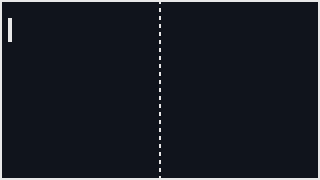
Hold W and the paddle moves up two pixels a tick. Hold S and it moves down. Hold
both and the moves cancel, so the paddle stays where it is. Let go and the paddle
stops on that tick because IsKeyPressed is read again every tick.
clamp keeps the paddle inside the two-pixel border. Its top edge can
be as high as row 2 and as low as row 154, which puts the bottom edge on row 177.
The clamp runs after movement, so holding W at the top has no visible effect.
Update reads the keys and hands them to step.
step receives a keys value, not the keyboard itself.
That keeps the physical controls in readKeys and the paddle rules in
step.
Reading a press once
A serve should happen once per press. Ebitengine's inpututil package
keeps last tick's keyboard state and compares it with this tick.
IsKeyJustPressed is true only on the tick a key goes down.
// cmd/paddle/main.go — extend
import (
	"image/color"
	"log"

	"github.com/hajimehoshi/ebiten/v2"
	"github.com/hajimehoshi/ebiten/v2/inpututil"
	"github.com/hajimehoshi/ebiten/v2/vector"
)

// keys is what the player is doing this tick: the keys held, and the keys
// that went down this tick.
type keys struct {
	up, down bool // W and S, while held
	serve    bool // Space, on the tick it went down
}

// readKeys asks Ebitengine about the keyboard, once a tick.
func readKeys() keys {
	var k keys
	k.up = ebiten.IsKeyPressed(ebiten.KeyW)
	k.down = ebiten.IsKeyPressed(ebiten.KeyS)
	k.serve = inpututil.IsKeyJustPressed(ebiten.KeySpace)
	return k
}

type Game struct {
	paddleY float64 // the paddle's top edge
	balls   []ball  // every ball in flight, oldest first
}

// step advances the game one tick with what the player is doing.
func (g *Game) step(k keys) {
	if k.up {
		g.paddleY -= paddleSpeed
	}
	if k.down {
		g.paddleY += paddleSpeed
	}
	g.paddleY = clamp(g.paddleY, border, screenH-border-paddleH)
	if k.serve {
		g.balls = append(g.balls, ball{x: paddleX + paddleW, y: g.paddleY + paddleH/2 - 2})
	}
	kept := g.balls[:0]
	for _, b := range g.balls {
		b.x += ballSpeed
		if b.x < screenW {
			kept = append(kept, b)
		}
	}
	g.balls = kept
}

func (g *Game) Draw(screen *ebiten.Image) {
	drawCourt(screen)
	g.drawPaddle(screen)
	g.drawBalls(screen)
}

// A ball served from the paddle flies right at six pixels a tick.
const ballSpeed = 6

type ball struct {
	x, y float64
}

func (g *Game) drawBalls(screen *ebiten.Image) {
	for _, b := range g.balls {
		vector.FillRect(screen, float32(b.x), float32(b.y), 4, 4, lineColor, false)
	}
}
go vet ./...
go run ./cmd/paddle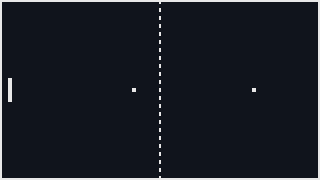
Tap Space and a four-pixel ball leaves the paddle's face. It starts level with the
paddle's middle. Hold Space and only one ball leaves, because k.serve
is true on one tick.
The balls live in a slice. A serve appends a ball. Each tick moves every ball six
pixels and keeps only the balls still on the court. The keepers are appended to
g.balls[:0], which reuses the same backing array instead of making a
new one.
The extend listing changes the import block, keys,
readKeys, Game, step and
Draw. The ball declarations are new and go at the end of the file.
IsKeyPressed reads naturally for Space, but it gives the wrong kind
of answer for a serve. Use it for the serve:
func readKeys() keys {
	var k keys
	k.up = ebiten.IsKeyPressed(ebiten.KeyW)
	k.down = ebiten.IsKeyPressed(ebiten.KeyS)
	k.serve = ebiten.IsKeyPressed(ebiten.KeySpace)
	return k
}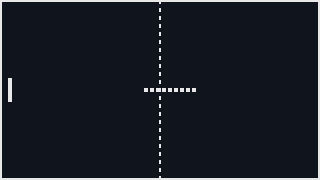
One tap makes nine balls because the tap lasted nine ticks. On each of those ticks,
k.serve was true. Each ball is six pixels behind the one before it
because each one left the paddle one tick later.
A held Space key serves sixty balls a second. The program cannot tell a tap from a
hold because IsKeyPressed answers only about this tick.
inpututil remembers the previous tick, so it can answer whether the
key went down now. Put IsKeyJustPressed back.
Reading the mouse
// cmd/paddle/main.go — extend
// keys is what the player is doing this tick: the keys held, the keys
// that went down this tick, and where the mouse is.
type keys struct {
	up, down bool // W and S, while held
	serve    bool // Space, on the tick it went down
	click    bool // the left mouse button, on the tick it went down
	mx, my   int  // the cursor, in the picture's pixels
}

// readKeys asks Ebitengine about the keyboard and the mouse, once a tick.
func readKeys() keys {
	var k keys
	k.up = ebiten.IsKeyPressed(ebiten.KeyW)
	k.down = ebiten.IsKeyPressed(ebiten.KeyS)
	k.serve = inpututil.IsKeyJustPressed(ebiten.KeySpace)
	k.click = inpututil.IsMouseButtonJustPressed(ebiten.MouseButtonLeft)
	k.mx, k.my = ebiten.CursorPosition()
	return k
}

type Game struct {
	paddleY float64 // the paddle's top edge
	balls   []ball  // every ball in flight, oldest first
	mx, my  int     // where the cursor was on the last tick
}

// step advances the game one tick with what the player is doing.
func (g *Game) step(k keys) {
	if k.up {
		g.paddleY -= paddleSpeed
	}
	if k.down {
		g.paddleY += paddleSpeed
	}
	if k.click {
		g.paddleY = float64(k.my) - paddleH/2 // the paddle's middle to the cursor's row
	}
	g.paddleY = clamp(g.paddleY, border, screenH-border-paddleH)
	g.mx, g.my = k.mx, k.my
	if k.serve {
		g.balls = append(g.balls, ball{x: paddleX + paddleW, y: g.paddleY + paddleH/2 - 2})
	}
	kept := g.balls[:0]
	for _, b := range g.balls {
		b.x += ballSpeed
		if b.x < screenW {
			kept = append(kept, b)
		}
	}
	g.balls = kept
}

func (g *Game) Draw(screen *ebiten.Image) {
	drawCourt(screen)
	g.drawPaddle(screen)
	g.drawBalls(screen)
	g.drawCursor(screen)
}

// drawCursor marks the cursor with a small cross.
func (g *Game) drawCursor(screen *ebiten.Image) {
	x, y := float32(g.mx), float32(g.my)
	vector.StrokeLine(screen, x-4, y, x+5, y, 1, dimColor, false)
	vector.StrokeLine(screen, x, y-4, x, y+5, 1, dimColor, false)
}
go vet ./...
go run ./cmd/paddle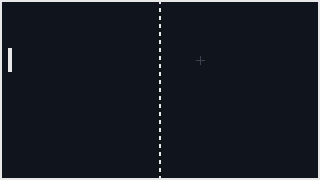
Move the mouse and the grey cross follows it in the picture's own pixels. Drag the
window larger and the cross does not speed up. Ebitengine maps the cursor into the
320-by-180 coordinates that Layout chose.
Click and the paddle jumps so its middle is on the cursor's row. The next line
clamps it, so a click near the border cannot push it through the wall. The cursor's
position is copied into the game in Update and drawn from that copy in
Draw.
Before the cursor enters the window, Ebitengine reports the last position it knew. At the start, that is the top-left corner, so the cross sits there until the mouse moves.
ebiten.IsKeyPressed(key) is true while a key is held; the keys are
constants such as ebiten.KeyW, ebiten.KeySpace and
ebiten.KeyArrowUp, one per physical key.
inpututil.IsKeyJustPressed(key) is true on the tick the key went down,
and inpututil.IsMouseButtonJustPressed(ebiten.MouseButtonLeft) the
same for a button. ebiten.CursorPosition() returns the cursor in the
game's own coordinates; it can be outside the picture when the cursor is outside
the window. None of these reports events: each reports the state at the moment it
is asked, so Update asks once a tick. The reference is
pkg.go.dev/github.com/hajimehoshi/ebiten/v2/inpututil.
Keeping input in one value
The operating system sees input as events: a key went down, then a key came up.
Ebitengine turns that stream into answers the game can poll once per tick.
inpututil adds the comparison with the previous tick.
Reading input at the top of Update gives the whole tick one set of
answers. A key cannot be held in step and released in
Draw, because Draw does not ask the keyboard. It draws the
state that Update already decided.
Checkpoint
- Move a paddle two pixels a tick while a key is held and keep it inside a two-pixel border with a clamp, and say which rows its top edge can occupy.
- Read a key that should act once per press with
inpututil, and explain, in ticks, what a tap of Space does when it is read as held instead. - Pack the keys, the just-pressed keys and the cursor into one value at the top
of
Update, and say what that buys the rest of the tick. - Read the cursor in the picture's coordinates and move something to its row on a click.
- Walk a slice of balls, moving each and dropping the ones that have left, without allocating.
Exercise 1 — the arrows too. Make Up and Down move the
paddle as well as W and S, without touching step.
Two lines in readKeys: k.up = ebiten.IsKeyPressed(ebiten.KeyW)
|| ebiten.IsKeyPressed(ebiten.KeyArrowUp), and the same for down.
step sees a boolean and does not know two keys feed it, which is
what the keys value is for.
Exercise 2 — a second paddle. Add a paddle on column 308 under the Up and Down arrows, and serve the balls from whichever paddle was moved last.
A second Y field and two more booleans in keys; a
last field set to 1 or 2 whenever a paddle's keys are held; the
serve reads last to pick the paddle and the direction, and the
ball type needs a velocity so that a ball from the right paddle flies left.
Both paddles clamp to the same two rows.
Exercise 3 — the count in the title. Count the serves and show the count in the window's title.
A serves field incremented where the ball is appended, and
ebiten.SetWindowTitle(fmt.Sprintf("Paddle: %d serves", g.serves))
on the same line, with fmt imported. Tap Space three times and the
title bar reads 3; hold it and it still reads one more, which is the chapter's
point, made by the window manager.