Testing Your Labs (optional)
Recording lab input
This chapter is optional. It shows how to record a lab's keys, replay them without a window, pin printed numbers in Go tests and write frame images. The motion labs don't depend on this chapter.
A lab gets outside input as eight booleans per tick. readKeys fills
them, and step receives them. A run is the lab name, seed, flags and the
keys held on each tick.
Store those keys in a text file and a fresh lab can step through them later. If the
lab reads no clock and no unseeded random number, the replay prints the same numbers.
A frame image is the same idea with one extra call to Draw.
Recording keys
Add recording and replay flags to cmd/motion. The recording format has
one line per tick. A line lists the key names held on that tick, separated by spaces.
An empty line means no keys were held.
// cmd/motion/record.go — create
package main

import (
	"bufio"
	"flag"
	"fmt"
	"os"
	"strings"
)

// A recording is a text file with one line per tick: the names of the keys
// held on that tick, separated by spaces, or an empty line when none was.
var (
	record = flag.String("record", "", "write the keys held on every tick of this run to the file named")
	replay = flag.String("replay", "", "step the lab through the recording in the file named, with no window")
)

// String names the held keys, in a fixed order.
func (k keys) String() string {
	var names []string
	for _, key := range []struct {
		held bool
		name string
	}{{k.left, "left"}, {k.right, "right"}, {k.up, "up"}, {k.down, "down"}, {k.w, "w"}, {k.s, "s"}, {k.space, "space"}, {k.r, "r"}} {
		if key.held {
			names = append(names, key.name)
		}
	}
	return strings.Join(names, " ")
}

// parseKeys reads one line of a recording back into a keys value.
func parseKeys(line string) (keys, error) {
	var k keys
	for _, name := range strings.Fields(line) {
		switch name {
		case "left":
			k.left = true
		case "right":
			k.right = true
		case "up":
			k.up = true
		case "down":
			k.down = true
		case "w":
			k.w = true
		case "s":
			k.s = true
		case "space":
			k.space = true
		case "r":
			k.r = true
		default:
			return k, fmt.Errorf("%q is not a key", name)
		}
	}
	return k, nil
}

// writeRecording writes one line per tick to the file at path.
func writeRecording(path string, ticks []keys) error {
	f, err := os.Create(path)
	if err != nil {
		return err
	}
	w := bufio.NewWriter(f)
	for _, k := range ticks {
		fmt.Fprintln(w, k)
	}
	if err := w.Flush(); err != nil {
		f.Close()
		return err
	}
	return f.Close()
}

// readRecording reads the file at path back into one keys value per tick.
func readRecording(path string) ([]keys, error) {
	f, err := os.Open(path)
	if err != nil {
		return nil, err
	}
	defer f.Close()
	var ticks []keys
	sc := bufio.NewScanner(f)
	for sc.Scan() {
		k, err := parseKeys(sc.Text())
		if err != nil {
			return nil, fmt.Errorf("%s line %d: %v", path, len(ticks)+1, err)
		}
		ticks = append(ticks, k)
	}
	return ticks, sc.Err()
}

// replayLab steps a fresh lab through every tick of the recording at
// path, with no window; the lab prints what it always prints.
func replayLab(name string, seed uint64, path string) error {
	ticks, err := readRecording(path)
	if err != nil {
		return err
	}
	l, err := newLab(name, seed)
	if err != nil {
		return err
	}
	g := &Game{lab: l}
	for _, k := range ticks {
		g.step(k)
	}
	fmt.Printf("%s: %d ticks replayed\n", path, len(ticks))
	return nil
}
// cmd/motion/main.go — extend
// Game is the window round one lab.
type Game struct {
lab lab
hud *hud
tick int
recorded []keys // the keys held on every tick so far, when recording
}
func (g *Game) Update() error {
k := readKeys()
if *record != "" {
g.recorded = append(g.recorded, k)
}
g.step(k)
return nil
}
func main() {
flag.Parse()
if *replay != "" {
if err := replayLab(*labFlag, *seedFlag, *replay); err != nil {
log.Fatal(err)
}
return
}
l, err := newLab(*labFlag, *seedFlag)
if err != nil {
log.Fatal(err)
}
h, err := newHUD()
if err != nil {
log.Fatal(err)
}
ebiten.SetWindowSize(960, 540)
ebiten.SetWindowTitle("Motion: " + *labFlag)
ebiten.SetTPS(60)
g := &Game{lab: l, hud: h}
if err := ebiten.RunGame(g); err != nil {
log.Fatal(err)
}
if *record != "" {
if err := writeRecording(*record, g.recorded); err != nil {
log.Fatal(err)
}
fmt.Printf("%s: %d ticks recorded\n", *record, len(g.recorded))
}
}go vet ./...
mkdir -p tapes
go run ./cmd/motion -lab ball -record tapes/my-ball.txt
Play the ball lab with -record, hold Up in the middle and close the
window. The program writes one line for every tick the window was open. Open the
file and the held-Up section appears as a block of up lines.
The recording used here is three hundred ticks long, with Up held from tick 121 to
180. Download it into tapes/ beside your own recordings.
go run ./cmd/motion -lab ball -replay tapes/ch21-ball.txt$ go run ./cmd/motion -lab ball -replay tapes/ch21-ball.txt
gravity 600.0000 px/s^2, drag 0.9800 a tick, one tick 0.0167 s: each tick adds 10.0000 px/s and keeps 0.9800 of the total
terminal speed 10.0000 x 0.9800 / 0.0200 = 490.0000 px/s, 8.1667 px a tick
tick 30 pos (160.0000, 63.1180) vel (0.0000, 222.7127)
tick 60 pos (160.0000, 208.9042) vel (0.0000, 344.1990)
tick 90 pos (160.0000, 399.7846) vel (0.0000, 410.4678)
tick 120 pos (160.0000, 615.2632) vel (0.0000, 446.6164)
tick 150 pos (160.0000, 686.3649) vel (0.0000, -90.4468)
tick 180 pos (160.0000, 558.1152) vel (0.0000, -383.4063)
tick 210 pos (160.0000, 478.9174) vel (0.0000, 13.5706)
tick 240 pos (160.0000, 547.0726) vel (0.0000, 230.1152)
tick 270 pos (160.0000, 695.6065) vel (0.0000, 348.2369)
tick 300 pos (160.0000, 887.9858) vel (0.0000, 412.6705)
tapes/ch21-ball.txt: 300 ticks replayed
No window opens. replayLab builds the lab, wraps it in a
Game with no display and calls the same step once per line
in the file. The lab receives keys the same way it did in the window.
Recording happens in Update, the one place keys are read. The file is
written after RunGame returns, when the window has closed.
String and parseKeys are the same key table read in
opposite directions. An unknown word fails with its line number.
A recording holds the keys and nothing else. Replay it with -explicit:
$ go run ./cmd/motion -lab ball -replay tapes/ch21-ball.txt -explicit
gravity 600.0000 px/s^2, drag 0.9800 a tick, one tick 0.0167 s: each tick adds 10.0000 px/s and keeps 0.9800 of the total
terminal speed 10.0000 x 0.9800 / 0.0200 = 490.0000 px/s, 8.1667 px a tick
tick 30  pos (160.0000, 59.4061)  vel (0.0000, 222.7127)
tick 60  pos (160.0000, 203.1675)  vel (0.0000, 344.1990)
tick 90  pos (160.0000, 392.9435)  vel (0.0000, 410.4678)
tick 120  pos (160.0000, 607.8196)  vel (0.0000, 446.6164)
tick 150  pos (160.0000, 687.8723)  vel (0.0000, -90.4468)
tick 180  pos (160.0000, 564.5053)  vel (0.0000, -383.4063)
tick 210  pos (160.0000, 478.6912)  vel (0.0000, 13.5706)
tick 240  pos (160.0000, 543.2373)  vel (0.0000, 230.1152)
tick 270  pos (160.0000, 689.8026)  vel (0.0000, 348.2369)
tick 300  pos (160.0000, 881.1079)  vel (0.0000, 412.6705)
tapes/ch21-ball.txt: 300 ticks replayed
The same recording runs for three hundred ticks, but the ball ends at 881.11 instead of 887.99. The keys didn't change. The flag changed the integrator.
A recording reproduces the inputs. A full run is inputs plus program, flags and seed. A test that replays a recording has to name all of them.
Testing printed numbers
A printed number can become a test. Add one test that drops a body for ten seconds and pins its speed. Add another that replays the recording and pins the ball's final position.
// cmd/motion/ball_test.go — create
package main

import (
	"fmt"
	"testing"

	"gez/internal/vec"
)

// TestBallTerminal drops a body under the ball lab's gravity and drag for
// ten seconds and pins its speed at the end to four decimal places, and
// pins the speed the formula says it is heading for.
func TestBallTerminal(t *testing.T) {
	b := vec.Body{Acc: vec.Vec2{Y: gravity}}
	for i := 0; i < 600; i++ {
		b = b.Step(drag)
	}
	got, want := fmt.Sprintf("%.4f", b.Vel.Y), fmt.Sprintf("%.4f", vec.Terminal(gravity, drag))
	t.Logf("after 600 ticks the ball falls at %s px/s, heading for %s", got, want)
	if got != "489.9973" || want != "490.0000" {
		t.Fatalf("speed %s, terminal %s", got, want)
	}
}

// TestBallReplay steps the ball lab through the shipped recording and
// pins where the ball ends.
func TestBallReplay(t *testing.T) {
	ticks, err := readRecording("../../tapes/ch21-ball.txt")
	if err != nil {
		t.Fatal(err)
	}
	l := newBallLab()
	for _, k := range ticks {
		l.step(k)
	}
	got := fmt.Sprintf("%v", l.body.Pos)
	t.Logf("%d ticks: the ball ends at %s", len(ticks), got)
	if len(ticks) != 300 || got != "(160.0000, 887.9858)" {
		t.Fatalf("%d ticks, ends at %s", len(ticks), got)
	}
}
go test ./cmd/motion -run TestBallTerminal -v$ go test ./cmd/motion -run TestBallTerminal -v
=== RUN TestBallTerminal
ball_test.go:19: after 600 ticks the ball falls at 489.9973 px/s, heading for 490.0000
--- PASS: TestBallTerminal (0.00s)
PASS
ok gez/cmd/motion 0.00s
A Go test lives in a file ending in _test.go. Its function name starts
with Test and it takes *testing.T. go test
compiles the package with its tests and runs the selected functions.
The test is in package main, beside the lab, so it can read
gravity and drag without exporting them. It pins the speed
as a four-decimal string because that is the precision the lab prints.
Change drag to 0.99 and the test fails with the new numbers. That is
the point of the test: a change that should leave the ball alone moves a pinned
value. A planned change gets a new expected value only after the new output has
been read.
The replay test reads ../../tapes/ch21-ball.txt because
go test runs from cmd/motion. The lab still prints as it
steps, so the test output includes the lab's lines before the final assertion.
go test ./cmd/motion runs every test in the package and prints one
line, ok or FAIL; -run Name selects tests
whose names match; -v shows each test; -count=1 makes it
run again instead of printing a cached result, which matters for a test whose
inputs the cache cannot see. A test passes unless it calls t.Fatal,
t.Fatalf or t.Errorf. The reference is go help
test and pkg.go.dev/testing.
Writing frame images
A frame image comes from stepping a lab to a tick, calling Draw once and
writing the pixels to a PNG. This stage adds the shot package and a test
that writes two ball-lab pictures.
// internal/shot/shot.go — create
// Package shot makes pictures of a game without anyone at the keyboard: it
// opens a window, advances a game a given number of ticks by calling a
// function once per tick, draws one picture, and writes it to a PNG file.
// Every picture in this volume was made with it.
package shot

import (
	"fmt"
	"image"
	"image/png"
	"os"
	"path/filepath"

	"github.com/hajimehoshi/ebiten/v2"
)

// The pictures are the size every game in this volume draws.
const (
	ScreenW = 320
	ScreenH = 180
)

// Frame is one picture to make: Step is called once for each of Ticks
// ticks, then Draw paints the picture, and the picture is written to Path.
type Frame struct {
	Path  string
	Ticks int
	Step  func()
	Draw  func(screen *ebiten.Image)
}

// runner is the game the window runs: it works through the frames in
// order, all of one frame's ticks in a single Update, then takes the
// picture in the Draw that follows.
type runner struct {
	frames []Frame
	i      int  // the frame being made
	ready  bool // the frame's ticks have all been stepped
	err    error
}

func (r *runner) Update() error {
	if r.err != nil || r.i >= len(r.frames) {
		return ebiten.Termination
	}
	if r.ready {
		return nil // stepped; wait for Draw to take the picture
	}
	f := r.frames[r.i]
	for t := 0; t < f.Ticks; t++ {
		f.Step()
	}
	r.ready = true
	return nil
}

func (r *runner) Draw(screen *ebiten.Image) {
	if !r.ready || r.i >= len(r.frames) {
		return
	}
	f := r.frames[r.i]
	f.Draw(screen)
	if err := save(screen, f.Path); err != nil {
		r.err = err
		return
	}
	fmt.Printf("%s: tick %d, %dx%d\n", f.Path, f.Ticks, screen.Bounds().Dx(), screen.Bounds().Dy())
	r.i++
	r.ready = false
}

func (r *runner) Layout(outsideWidth, outsideHeight int) (int, int) {
	return ScreenW, ScreenH
}

// save writes the picture screen holds to path as a PNG: every pixel, four
// bytes each, exactly what was drawn.
func save(screen *ebiten.Image, path string) error {
	w, h := screen.Bounds().Dx(), screen.Bounds().Dy()
	img := image.NewRGBA(image.Rect(0, 0, w, h))
	screen.ReadPixels(img.Pix)
	if err := os.MkdirAll(filepath.Dir(path), 0o755); err != nil {
		return err
	}
	f, err := os.Create(path)
	if err != nil {
		return err
	}
	if err := png.Encode(f, img); err != nil {
		f.Close()
		return err
	}
	return f.Close()
}

// Run makes every frame in turn in one window, then closes it. Ebitengine
// runs one window per process, so a test makes all of its pictures in one
// call.
func Run(frames []Frame) error {
	ebiten.SetWindowSize(960, 540)
	ebiten.SetWindowTitle("shot")
	ebiten.SetTPS(60)
	r := &runner{frames: frames}
	if err := ebiten.RunGame(r); err != nil {
		return err
	}
	return r.err
}

// AtRoot moves the process to the module's root, where go.mod is, so that
// a test reads assets/ and tapes/ the way the programs do. go test starts a
// test in its package's directory; a second test in the same process finds
// the process already there.
func AtRoot() {
	for i := 0; i < 4; i++ {
		if _, err := os.Stat("go.mod"); err == nil {
			return
		}
		os.Chdir("..")
	}
}
// cmd/motion/frame_test.go — create
package main
import (
"testing"
"gez/internal/shot"
)
// TestBallFrames steps the ball lab through the shipped recording in a
// window and writes two pictures of it: a second in, and at the end of
// the second of thrust.
func TestBallFrames(t *testing.T) {
shot.AtRoot()
ticks, err := readRecording("tapes/ch21-ball.txt")
if err != nil {
t.Fatal(err)
}
l, err := newLab("ball", 1)
if err != nil {
t.Fatal(err)
}
h, err := newHUD()
if err != nil {
t.Fatal(err)
}
g := &Game{lab: l, hud: h}
i := 0
step := func() {
var k keys
if i < len(ticks) {
k = ticks[i]
}
i++
g.step(k)
}
err = shot.Run([]shot.Frame{
{Path: "assets/frames/ch14-fall.png", Ticks: 60, Step: step, Draw: g.Draw},
{Path: "assets/frames/ch14-thrust.png", Ticks: 120, Step: step, Draw: g.Draw},
})
if err != nil {
t.Fatal(err)
}
}go vet ./...
go test ./cmd/motion -run TestBallFrames -v$ go test ./cmd/motion -run TestBallFrames -v
=== RUN TestBallFrames
gravity 600.0000 px/s^2, drag 0.9800 a tick, one tick 0.0167 s: each tick adds 10.0000 px/s and keeps 0.9800 of the total
terminal speed 10.0000 x 0.9800 / 0.0200 = 490.0000 px/s, 8.1667 px a tick
tick 30 pos (160.0000, 63.1180) vel (0.0000, 222.7127)
tick 60 pos (160.0000, 208.9042) vel (0.0000, 344.1990)
assets/frames/ch14-fall.png: tick 60, 320x180
tick 90 pos (160.0000, 399.7846) vel (0.0000, 410.4678)
tick 120 pos (160.0000, 615.2632) vel (0.0000, 446.6164)
tick 150 pos (160.0000, 686.3649) vel (0.0000, -90.4468)
tick 180 pos (160.0000, 558.1152) vel (0.0000, -383.4063)
assets/frames/ch14-thrust.png: tick 120, 320x180
--- PASS: TestBallFrames (0.00s)
PASS
ok gez/cmd/motion 0.00s
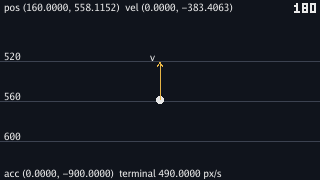
A window opens for a moment and closes. Two files appear under
assets/frames/. They come from the same recording, the same
step and the same Draw as the lab.
The package prints the tick count for each picture. The first frame steps 60 ticks. The second steps 120 more, so it captures tick 180 of the lab. The lab's own lines appear between the frame lines because the lab prints while it steps.
shot.Run steps all ticks for one frame inside one Update,
then captures the following Draw. save reads the pixels
from Ebitengine's image and encodes them at 320 by 180.
Keeping labs replayable
A recording works because each lab reads only the keys it is handed. The lab's next state is a function of its last state and this tick's keys. That function can be called again by a test.
A lab that reads time.Now or an unseeded generator inside
step can still run, but it cannot be pinned this way. The recording
supplies only keys. Keep outside data behind flags or outside step when
a lab's numbers need tests.
Checkpoint
- Record a lab's keys to a text file and read the file: one line a tick, the keys' names, an empty line for none.
- Replay a recording with no window and say why the lab prints the same lines, and which four things a run is made of.
- Read a replay that ends 6.9 pixels short back to a flag the recording did not carry.
- Pin a printed number to four decimal places in a test, and say why a string and not a float.
- Make a picture of any tick of any lab with
shot.Run, from a recording or from keys written in the test. - Say what a lab may not read if its runs are to be replayed and pinned.
Exercise 1 — pin the sandbox. Write a test that steps the sandbox six hundred ticks from seed 1 and pins where ball 0 ends.
s := newSandbox(1), six hundred s.step(keys{}), and
fmt.Sprintf("%v", s.balls[0].Pos) against the line chapter 20
printed at tick 600. Change the restitution by a hundredth and the test fails
in the second decimal place of both coordinates: a hundred balls' worth of
bounces amplify a small change into a different pile, which is the sensitivity
a test of a physics system has to expect and the reason its numbers are pinned
after the change is understood.
Exercise 2 — a picture of the pile. Make chapter 20's
picture of the pile at tick 300 with a test of your own, and compare the two
files byte for byte with cmp.
A shot.Frame with Ticks: 300, a step function that
calls g.step(keys{}) on a sandbox game from seed 1, and
Draw: g.Draw, written to a path of your own. cmp
against assets/frames/ch20-pile.png prints nothing, which is its
way of saying the two are identical: the same arithmetic, the same drawing
calls, the same pixels.
Exercise 3 — a recording that fails on purpose. Record
a run of the ease lab in which you pause at t = 0.5 and step to tick 90, and
write a test that replays it and pins the last column line the lab prints.
Then change ElasticPeriod.
Capture the printed lines during the replay by pointing os.Stdout
at a pipe, or pin the lab's state instead: after the replay,
dotX(vec.ElasticOut, l.t()) for the paused lab. With the period
changed the elastic column moves and the test fails with the new number,
while every other easing's column is the same, which tells you which change
you made without reading the diff.