Angles and Trigonometry
Angles on a unit circle
This chapter starts the motion labs and the internal/vec package. The
first lab draws a unit circle, turns a point around it with the arrow keys and prints
the point's angle in radians and degrees.
Work in the same ~/gez module. The new package,
internal/vec, imports nothing from Ebitengine. The new program,
cmd/motion, opens one lab at a time with a flag such as
go run ./cmd/motion -lab circle.
A point at forty-five degrees on a circle sixty pixels in radius sits 42.43 pixels to the right of the centre and 42.43 pixels below it. The program stores the angle, 0.7854 radians, and derives those two numbers from cosine and sine.
Cosine and sine
Draw a circle of radius one round the origin and start at the point where it crosses the positive x-axis, (1, 0). Walk round the rim through an angle; where you stop is the angle's point, and its two coordinates have names. The x-coordinate is the angle's cosine and the y-coordinate is its sine. Both are projections: drop straight from the point to the x-axis and the foot of the drop is at cos; go straight across to the y-axis and you arrive at sin. At forty-five degrees the two are equal, and because the point is on a circle of radius one they obey cos² + sin² = 1, so each is the square root of one half, 0.7071. At thirty degrees the drop makes a right triangle whose short side is half the radius, so sin 30° is exactly 0.5 and cos 30° is the square root of 1 − 0.25, 0.8660. Sixty degrees is the same triangle stood on its other side: cos 0.5, sin 0.8660. Ninety degrees is the top of the circle, (0, 1); one hundred and eighty is (−1, 0); two hundred and seventy is (0, −1).
A point at distance r along the same angle is the unit point times r. At sixty pixels a unit, forty-five degrees is 0.7071 × 60 = 42.43 pixels each way. That multiplication is the whole of the rule above.
The program measures angles in radians: the length of the arc the walk covered on
the circle of radius one. A full turn is the circumference, 2π = 6.2832, so one
degree is π/180 of a radian, 0.0175, and forty-five degrees is 0.7854. A person
reads degrees and a program computes in radians, and the conversion is one
multiplication each way, done at the edge where a person types or reads a number.
Going the other way, from a point back to its angle, is one function:
atan2 takes the y and then the x, in that order, and answers with the
angle whose cosine and sine have those signs and that ratio, in the range from −π
to π. Two hundred and ten degrees comes back as −150, the same direction named from
the other side.
Four functions carry that interlude, and none of them knows what a screen is.
Radians and Degrees are the two conversions;
OnCircle is the unit point, cos then sin; AngleOf is
atan2 with its arguments in the order a person writes the point.
// internal/vec/angle.go — create
// Package vec is the mathematics of motion in two dimensions: angles,
// vectors, transforms, integration, interpolation, seeded distributions,
// overlap tests, matrices and curves. It imports nothing from Ebitengine.
// Every function in it is pure: the same arguments give the same answer,
// and nothing here reads a clock, a key or a file.
package vec

import "math"

// Radians converts an angle in degrees to radians. A full turn is 360
// degrees and 2π radians, so one degree is π/180 of a radian.
func Radians(deg float64) float64 {
	return deg * math.Pi / 180
}

// Degrees converts an angle in radians to degrees.
func Degrees(rad float64) float64 {
	return rad * 180 / math.Pi
}

// OnCircle returns the point at angle a on the circle of radius one
// centred on the origin: cos a along x and sin a along y.
func OnCircle(a float64) (x, y float64) {
	return math.Cos(a), math.Sin(a)
}

// AngleOf returns the angle, in radians, of the direction from the origin
// to (x, y): the angle OnCircle needs to land on that direction. The
// answer is in (−π, π], and it reads the signs of both arguments to tell
// the four quadrants apart.
func AngleOf(x, y float64) float64 {
	return math.Atan2(y, x)
}
go vet ./...
Each lab's mathematics goes into this directory in a file of its own, and the
package comment is the promise every file keeps: nothing in vec reads a key,
opens a window or asks the time, so every function can be called from a program
with a window, from a program without one, and from a hand calculation on paper,
and gets the same answer. math.Cos and math.Sin take
radians, which is the only reason Radians exists; the page works in
degrees and the code in radians, and the two meet in that one line.
AngleOf exists so that the argument order of atan2, y
first, is written down once, in a function whose signature puts x first.
Building the motion lab
The labs share a window, keys and a HUD. main.go keeps the same
320-by-180 picture, 960-by-540 window and sixty ticks a second from volume 1. It
reads the keys once at the top of Update.
A lab is any value with three methods. It steps on the keys of this tick, draws its
picture and returns two lines of numbers. hud.go draws those lines and
the tick count.
// cmd/motion/main.go — create
package main

import (
	"flag"
	"fmt"
	"image/color"
	"log"

	"github.com/hajimehoshi/ebiten/v2"
	"github.com/hajimehoshi/ebiten/v2/inpututil"
)

// Every lab draws the 320-by-180 picture the games draw, in the same
// window: the numbers along the top and bottom rows, the picture between.
const (
	screenW = 320
	screenH = 180
)

var (
	courtColor = color.RGBA{R: 16, G: 20, B: 28, A: 255}
	lineColor  = color.RGBA{R: 232, G: 232, B: 232, A: 255}
	dimColor   = color.RGBA{R: 60, G: 66, B: 80, A: 255}
	xColor     = color.RGBA{R: 90, G: 170, B: 220, A: 255} // anything measured along x
	yColor     = color.RGBA{R: 230, G: 180, B: 70, A: 255} // anything measured along y
)

var labFlag = flag.String("lab", "circle", "the lab to open")

// keys is what the reader is doing this tick: the four arrows, W and S
// as held, and Space and R on the tick each went down.
type keys struct {
	left, right, up, down, w, s bool
	space, r                    bool
}

// readKeys asks Ebitengine about the eight keys, once a tick.
func readKeys() keys {
	return keys{
		left:  ebiten.IsKeyPressed(ebiten.KeyArrowLeft),
		right: ebiten.IsKeyPressed(ebiten.KeyArrowRight),
		up:    ebiten.IsKeyPressed(ebiten.KeyArrowUp),
		down:  ebiten.IsKeyPressed(ebiten.KeyArrowDown),
		w:     ebiten.IsKeyPressed(ebiten.KeyW),
		s:     ebiten.IsKeyPressed(ebiten.KeyS),
		space: inpututil.IsKeyJustPressed(ebiten.KeySpace),
		r:     inpututil.IsKeyJustPressed(ebiten.KeyR),
	}
}

// A lab is one scene: it steps on the keys of this tick, draws its
// picture, and says what its two lines of numbers read. The HUD is handed
// to draw so that a lab can label its picture in the same face.
type lab interface {
	step(k keys)
	draw(screen *ebiten.Image, h *hud)
	lines() (top, bottom string)
}

// newLab builds the lab named: the one place a name becomes a lab.
func newLab(name string) (lab, error) {
	switch name {
	case "circle":
		return newCircleLab(), nil
	}
	return nil, fmt.Errorf("no lab called %q", name)
}

// Game is the window round one lab.
type Game struct {
	lab  lab
	hud  *hud
	tick int
}

// step advances the lab one tick.
func (g *Game) step(k keys) {
	g.tick++
	g.lab.step(k)
}

func (g *Game) Update() error {
	g.step(readKeys())
	return nil
}

func (g *Game) Draw(screen *ebiten.Image) {
	screen.Fill(courtColor)
	g.lab.draw(screen, g.hud)
	top, bottom := g.lab.lines()
	g.hud.draw(screen, top, bottom, g.tick)
}

func (g *Game) Layout(outsideWidth, outsideHeight int) (int, int) {
	return screenW, screenH
}

func main() {
	flag.Parse()
	l, err := newLab(*labFlag)
	if err != nil {
		log.Fatal(err)
	}
	h, err := newHUD()
	if err != nil {
		log.Fatal(err)
	}
	ebiten.SetWindowSize(960, 540)
	ebiten.SetWindowTitle("Motion: " + *labFlag)
	ebiten.SetTPS(60)
	if err := ebiten.RunGame(&Game{lab: l, hud: h}); err != nil {
		log.Fatal(err)
	}
}
// cmd/motion/hud.go — create
package main
import (
"bytes"
"github.com/hajimehoshi/ebiten/v2"
"github.com/hajimehoshi/ebiten/v2/text/v2"
"golang.org/x/image/font/gofont/goregular"
"gez/internal/digits"
)
// The HUD is two lines of numbers, one along the top of the picture and
// one along the bottom, set in Go Regular at ten pixels because they hold
// decimals, minus signs and names, and the tick count at the top right in
// the sheet's digits, twice their size.
const (
hudSize = 10 // the face's size in pixels
hudTop = 2 // the top line's row
hudBelow = screenH - 12
)
type hud struct {
face *text.GoTextFace
font *digits.Font
}
// newHUD parses the font carried in the binary and cuts the digits from
// the sheet.
func newHUD() (*hud, error) {
font, err := digits.Load("assets/pong-sheet.png")
if err != nil {
return nil, err
}
src, err := text.NewGoTextFaceSource(bytes.NewReader(goregular.TTF))
if err != nil {
return nil, err
}
return &hud{face: &text.GoTextFace{Source: src, Size: hudSize}, font: font}, nil
}
// text draws s in the line colour with its left edge on column x and its
// top on row y.
func (h *hud) text(dst *ebiten.Image, s string, x, y float64) {
op := &text.DrawOptions{}
op.GeoM.Translate(x, y)
op.ColorScale.ScaleWithColor(lineColor)
text.Draw(dst, s, h.face, op)
}
// draw writes the two lines and the tick count.
func (h *hud) draw(dst *ebiten.Image, top, bottom string, tick int) {
h.text(dst, top, 4, hudTop)
h.text(dst, bottom, 4, hudBelow)
h.font.Draw(dst, tick, float64(screenW-4-digits.Width(tick, 2)), hudTop+1, 2)
}// cmd/motion/circle.go — create
package main
import (
"fmt"
"github.com/hajimehoshi/ebiten/v2"
"github.com/hajimehoshi/ebiten/v2/vector"
"gez/internal/vec"
)
// The circle lab draws the circle of radius one at sixty pixels a unit,
// centred in the picture, with a point on it that the arrow keys turn one
// degree a tick, and the point's two projections onto the axes.
const (
circleX = 160.0 // the circle's centre on the screen
circleY = 90.0
circleR = 60.0 // pixels a unit
turn = 1.0 // degrees a tick under an arrow key
)
// circleLab keeps one number, the angle, in radians. Where the point is
// follows from it and is never stored.
type circleLab struct {
angle float64
}
// newCircleLab starts the point on the x-axis and prints the conversion
// every angle in the lab goes through.
func newCircleLab() *circleLab {
fmt.Printf("a full turn is 360 deg = %.4f rad; one degree is %.4f rad; one radian is %.4f deg\n",
vec.Radians(360), vec.Radians(1), vec.Degrees(1))
return &circleLab{}
}
// point is where the angle lands on the circle of radius one.
func (l *circleLab) point() (x, y float64) {
return vec.OnCircle(l.angle)
}
// step turns the point: Right adds a degree, Left takes one away. Space
// prints the point and the angle read back off it.
func (l *circleLab) step(k keys) {
if k.right {
l.angle += vec.Radians(turn)
}
if k.left {
l.angle -= vec.Radians(turn)
}
if k.space {
x, y := l.point()
fmt.Printf("angle %.4f rad = %.4f deg point (%.4f, %.4f) atan2 %.4f rad = %.4f deg\n",
l.angle, vec.Degrees(l.angle), x, y, vec.AngleOf(x, y), vec.Degrees(vec.AngleOf(x, y)))
}
}
func (l *circleLab) draw(screen *ebiten.Image, h *hud) {
x, y := l.point()
px, py := float32(circleX+circleR*x), float32(circleY+circleR*y)
vector.StrokeLine(screen, circleX-76, circleY, circleX+76, circleY, 1, dimColor, false)
vector.StrokeLine(screen, circleX, circleY-72, circleX, circleY+72, 1, dimColor, false)
vector.StrokeCircle(screen, circleX, circleY, circleR, 1, dimColor, false)
vector.StrokeLine(screen, px, py, px, circleY, 1, xColor, false)
vector.StrokeLine(screen, px, py, circleX, py, 1, yColor, false)
vector.StrokeLine(screen, circleX, circleY, px, py, 1, lineColor, false)
vector.FillCircle(screen, px, py, 2.5, lineColor, false)
}
func (l *circleLab) lines() (top, bottom string) {
x, y := l.point()
return fmt.Sprintf("angle %.4f rad %.4f deg", l.angle, vec.Degrees(l.angle)),
fmt.Sprintf("cos %.4f sin %.4f atan2 %.4f deg", x, y, vec.Degrees(vec.AngleOf(x, y)))
}go vet ./...
go run ./cmd/motion -lab circle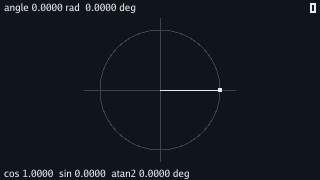
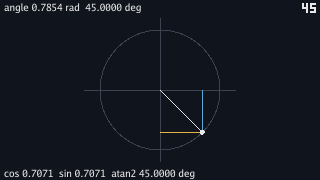
Hold Right and the point walks round the rim a degree a tick, clockwise, because the screen's rows number downward and a growing y goes down the picture. Press Space when the top line reads 45 and the program prints the point, then hold Right until it reads 210 and press Space again:
$ go run ./cmd/motion -lab circle
a full turn is 360 deg = 6.2832 rad; one degree is 0.0175 rad; one radian is 57.2958 deg
angle 0.7854 rad = 45.0000 deg  point (0.7071, 0.7071)  atan2 0.7854 rad = 45.0000 deg
angle 3.6652 rad = 210.0000 deg  point (-0.8660, -0.5000)  atan2 -2.6180 rad = -150.0000 deg
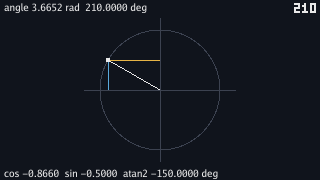
The first line is the one conversion the whole lab runs on, printed once when the
lab starts so that it can be checked against the interlude: 6.2832 is 2π, 0.0175 is
π/180 and 57.2958 is 180/π. The second line is the interlude's forty-five degrees
to four decimal places, and the third is the interlude's last sentence. At 210
degrees the cosine is −0.8660 and the sine −0.5000, the thirty-degree triangle
reflected through both axes, and atan2 hands back −2.6180 radians,
−150 degrees, because its answers live in the half-open range from −π to π and
210 is past π. Both names point at the same place on the rim; the lab stores the
angle it was given and the reading is what a program gets when it asks a point for
its angle.
The lab keeps one field. point derives the position from it on every
call, and draw calls point once and scales the pair by the
radius: the blue line from the point to the x-axis has its foot at cos, the gold
line to the y-axis ends at sin, and the radius is the hypotenuse of the triangle
they make. Space is read on the tick it goes down, as chapter 3 read the serve
key, so one press prints one line. The keys value carries the eight keys the labs use
between them; this one reads three.
Ebitengine supplies the window, IsKeyPressed and
IsKeyJustPressed, the line and circle strokes in
vector, and text/v2, which sets the two lines in the Go
Regular face carried in the binary, as chapter 5 did. The tick count at the top
right is drawn by internal/digits, chapter 5's package, from the sheet
chapter 4 downloaded to assets/pong-sheet.png; the lines are in a
TrueType face because they hold decimal points, minus signs and names, and the
sheet has digits and nothing else. FillCircle and
StrokeCircle take the centre and the radius; the rest of the
geometry in this chapter, which pixel the point is on, is the lab's own arithmetic.
math.Cos and math.Sin take radians and say nothing if
handed degrees; forty-five is as good a number as any. Change one line of
point to pass the angle as a number of degrees,
return vec.OnCircle(vec.Degrees(l.angle)), touch nothing else, and
hold Right for forty-five ticks:
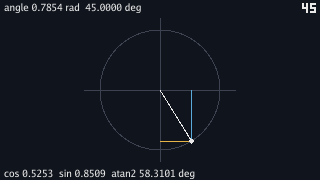
$ go run ./cmd/motion -lab circle
angle 0.7854 rad = 45.0000 deg  point (0.5253, 0.8509)  atan2 1.0177 rad = 58.3101 deg
The two lines of the display disagree with each other, and that is the symptom to
read. The top line is the stored angle and it is right: 0.7854 radians, forty-five
degrees. The bottom line is computed from the point, and the point is at 58.3101
degrees. Reason back from the number. Forty-five radians is seven full turns
(7 × 6.2832 = 43.98) and 1.0177 radians over, and 1.0177 radians is 58.31
degrees: the cosine and sine were given the number 45 and treated it as radians,
because that is the only thing they can do with a number. Hold Right and the
symptom is louder: every tick adds one degree to the angle and the point leaps
57.3 degrees round the rim, a whirl with no pattern a person can follow. The fix
is the line as stage 2 printed it, and the discipline behind the fix is the
interlude's: an angle is radians inside the program and becomes degrees only in a
Printf or a display line, never on its way into a function.
Wrapping an angle
Hold Right for a full turn and a bit more and the top line reads 370.0000 deg. The point is at ten degrees because a full turn returns to the start. The stored angle has kept growing.
A stored angle that grows without bound is hard to compare. A ship facing ten degrees
and a ship facing 370 degrees face the same way. Wrap brings either
angle into one turn.
// internal/vec/angle.go — extend
// Wrap brings an angle into [0, 2π), so that a point that has been turned
// round the circle twice reads as the point it is.
func Wrap(a float64) float64 {
	a = math.Mod(a, 2*math.Pi)
	if a < 0 {
		a += 2 * math.Pi
	}
	return a
}
// cmd/motion/circle.go — extend
// step turns the point: Right adds a degree, Left takes one away, and the
// angle is kept in [0, 2π). Space prints the point and the angle read
// back off it.
func (l *circleLab) step(k keys) {
if k.right {
l.angle += vec.Radians(turn)
}
if k.left {
l.angle -= vec.Radians(turn)
}
l.angle = vec.Wrap(l.angle)
if k.space {
x, y := l.point()
fmt.Printf("angle %.4f rad = %.4f deg point (%.4f, %.4f) atan2 %.4f rad = %.4f deg\n",
l.angle, vec.Degrees(l.angle), x, y, vec.AngleOf(x, y), vec.Degrees(vec.AngleOf(x, y)))
}
}go vet ./...
go run ./cmd/motion -lab circle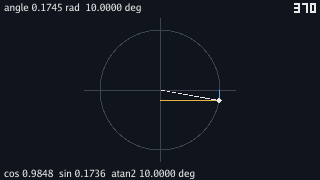
math.Mod returns the remainder of a division and keeps the sign of the
number it was given, so 370 degrees' worth of radians comes back as ten degrees'
worth, and −90 degrees' worth comes back as −90; the if adds a turn
to the negative case so that Left from the start reads 270 and not −90. That
choice is a convention and the page names it: the lab's angles live in
[0, 2π), which is what a compass does, while atan2 answers in
(−π, π], which is what a calculator does. The two agree on the point and
differ on the name of any angle past a half turn, and a program that stores an
angle picks one range and wraps into it every time the angle changes, as
step now does, so that no two stored angles name one direction.
Scaling the unit point
The unit circle gives every direction as two numbers: cosine and sine. To move a distance in that direction, multiply both numbers by the distance.
Store the angle and the length, and the position is two multiplications. Store the
position instead, and the angle has to be recovered with atan2. The
length then needs a square root. Neither tells how many turns the object made before
it reached that direction.
A screen's y coordinate grows downward. The unit-circle formulas still work because
they only return coordinates. In this lab a positive angle turns clockwise on the
screen. Draw y upward instead and the same vec functions still apply.
Checkpoint
- Work out where thirty, forty-five and sixty degrees land on the circle of radius one by hand, and where each lands at sixty pixels a unit.
- Convert forty-five degrees to 0.7854 radians and back, and say which way the lab's two lines of numbers convert and which way its arithmetic never does.
- Read an angle back off a point with
atan2, and say why 210 degrees comes back as −150 and what the point looks like either way. - Write a lab that plugs into
cmd/motion: a value withstep,drawandlines, named innewLab. - Take the display's two lines disagreeing by 13.3 degrees back to the line
that handed degrees to
math.Sin. - Keep a stored angle inside one turn with
Wrap, and say which range the lab wraps into and which rangeatan2answers in.
Exercise 1 — three radii. Draw the lab's point three times, at twenty, forty and sixty pixels a unit, on three concentric circles, all from the one stored angle.
In draw, loop over []float64{20, 40, 60} and compute
px, py from the same x, y with each radius in place
of circleR, stroking a circle of that radius and filling a point
on it. The three points lie on one straight line from the centre, whatever the
angle, because every one of them is the unit point times a length, and turning
the angle turns all three together.
Exercise 2 — the cursor sets the angle. With chapter 3's
CursorPosition, make the point follow the mouse: the angle is the
direction from the circle's centre to the cursor.
Read the cursor in step (add it to keys as two
integers, as chapter 3 did) and set
l.angle = vec.Wrap(vec.AngleOf(float64(mx)-circleX, float64(my)-circleY)).
The point stays on the rim however far away the cursor is, because
AngleOf keeps only the direction and the radius is the lab's; move
the cursor across the centre and the angle jumps by half a turn as the
direction reverses.
Exercise 3 — a quarter turn ahead. Draw a second, dim point a quarter turn ahead of the first, and print both points on Space. What is the relation between their coordinates?
The second point is vec.OnCircle(l.angle + vec.Radians(90)). Its
coordinates are the first point's swapped with one sign flipped: at forty-five
degrees the first is (0.7071, 0.7071) and the second (−0.7071, 0.7071), and in
general cos(θ + 90°) = −sin θ and sin(θ + 90°) = cos θ. A
quarter turn needs no trigonometry at all.