Kinematics
Forces and velocity
This chapter adds motion with acceleration. The ball lab drops a ball under gravity, lets keys push on its acceleration and prints the position and velocity every thirty ticks.
A thing with weight doesn't jump to the place a key names. A force changes its velocity, and the velocity changes its position. Each tick, the velocity takes the acceleration and drag first. Then the position takes the new velocity.
The tick length stays fixed at one sixtieth of a second. Ebitengine schedules those ticks; the motion code doesn't read the wall clock.
One tick of motion
Position is in pixels, velocity in pixels a second, acceleration in pixels a second per second, and a tick is 1/60 of a second, so a gravity of 600 adds 600 / 60 = 10 pixels a second to the velocity every tick. Drag is a multiplier: the velocity keeps 0.98 of itself each tick, which is a friction that takes more the faster the ball goes. One tick from rest is two lines. The velocity takes the acceleration and then the drag: (0 + 10) × 0.98 = 9.8. The position takes the new velocity for one tick: 0 + 9.8 / 60 = 0.1633. The second tick: velocity (9.8 + 10) × 0.98 = 19.404, position 0.1633 + 19.404 / 60 = 0.4867. The third: 28.8159 and 0.9670. That is the whole integrator, and it is called semi-implicit Euler because the position uses the velocity from the end of the tick and not the start.
The terminal speed is the speed at which the drag takes away in one tick exactly what the acceleration adds, so that the velocity after the tick is the velocity before it: v = (v + 10) × 0.98. Multiply out, v = 0.98v + 9.8; move the v across, 0.02v = 9.8; divide, v = 490. In symbols, v∞ = a · dt · k / (1 − k), with a the acceleration, dt the tick and k the drag. 490 pixels a second is 8.1667 pixels a tick, and the ball approaches it from below without ever reaching it, because each tick closes two per cent of whatever gap is left: 0.98 to the sixtieth power is 0.2976, so after sixty ticks 70.24 per cent of the gap is closed and the speed is 0.7024 × 490 = 344.199.
Using the start's velocity for the position instead is explicit Euler, the same two lines the other way round, and one second of free fall with no drag shows the difference by hand. Sixty ticks of ten pixels a second each: the semi-implicit ball's position after tick n has taken the velocities 10, 20, …, 10n, so after sixty it has fallen (10 + 20 + … + 600) / 60 = 305 pixels; the explicit ball took 0, 10, …, 590 and fell 295; the exact answer, half of 600 times one second squared, is 300, between the two, and both balls are moving at 600 pixels a second when they get there.
// internal/vec/motion.go — create
package vec

// Dt is the length of one tick in seconds, at sixty ticks a second. Every
// velocity in the package is in pixels a second and every acceleration in
// pixels a second a second, so that the numbers mean the same thing at any
// tick rate; the tick rate is here, once.
const Dt = 1.0 / 60

// Body is a thing that moves: where it is, how fast, and how fast that is
// changing. Like Vec2 it is a value; Step returns the body one tick on and
// leaves its receiver as it was.
type Body struct {
	Pos, Vel, Acc Vec2
}

// Step advances the body one tick by semi-implicit Euler: the velocity
// takes the acceleration first, then the drag, and the position takes the
// new velocity. Drag is a multiplier in (0, 1] applied to the velocity
// every tick; 1 is no drag at all.
func (b Body) Step(drag float64) Body {
	return Integrate(b, drag, Dt)
}

// Integrate is Step for a step of any length: velocity first, then
// position. Step calls it with Dt, and nothing else in the package should.
func Integrate(b Body, drag, dt float64) Body {
	b.Vel = b.Vel.Add(b.Acc.Scale(dt)).Scale(drag)
	b.Pos = b.Pos.Add(b.Vel.Scale(dt))
	return b
}

// Terminal is the speed at which the drag takes away, each tick, exactly
// what a constant acceleration adds: the speed Step settles at. It is the
// fixed point of v = (v + a·Dt)·drag, which is a·Dt·drag / (1 − drag).
func Terminal(acc, drag float64) float64 {
	return acc * Dt * drag / (1 - drag)
}
go vet ./...
Integrate is the interlude's two lines on vectors. It updates velocity
first, then position from the new velocity. Step calls it with
Dt, the fixed tick length.
A body is a value like a vector. b.Step(drag) returns the next body and
leaves b unchanged. That lets a program keep last tick's body beside
this tick's body if it needs both.
The units are pixels and seconds. The tick rate lives in one constant, so velocities still mean pixels per second instead of pixels per tick.
Dropping the ball
Extend cmd/motion with the ball lab. The lab drops a ball from the top
of a world with no bottom. The ball stays on row 100 of the picture while the world's
height rulings scroll past it.
Gravity is always present. Up adds upward thrust while held. Left and Right add sideways acceleration while held. Those keys change acceleration, not position.
// cmd/motion/ball.go — create
package main

import (
	"fmt"
	"math"

	"github.com/hajimehoshi/ebiten/v2"
	"github.com/hajimehoshi/ebiten/v2/vector"

	"gez/internal/vec"
)

// The ball lab drops a ball under gravity and drag, with keys that push on
// its acceleration and never on its position. The picture follows the ball
// down: it is drawn on row 100 whatever its height, and the world's rulings
// scroll past it, so a fall of thousands of pixels stays in view.
const (
	gravity  = 600.0  // pixels a second a second, downward
	drag     = 0.98   // the velocity keeps this much of itself every tick
	thrust   = 1500.0 // pixels a second a second, upward, while Up is held
	sideways = 600.0  // pixels a second a second, while Left or Right is held
	ballRow  = 100.0  // the screen row the ball is always drawn on
	ruling   = 40     // a line across the world every this many pixels of height
	every    = 30     // the lab prints its numbers every this many ticks
)

// ballLab keeps the body and counts its ticks; the acceleration is rebuilt
// from the keys every tick, so a key that is released stops pushing at
// once and gravity is always there.
type ballLab struct {
	tick int
	body vec.Body
}

// newBallLab starts the ball at rest at the top of the world and prints
// the speed it will settle at.
func newBallLab() *ballLab {
	fmt.Printf("gravity %.4f px/s^2, drag %.4f a tick, one tick %.4f s: each tick adds %.4f px/s and keeps %.4f of the total\n",
		gravity, drag, vec.Dt, gravity*vec.Dt, drag)
	term := vec.Terminal(gravity, drag)
	fmt.Printf("terminal speed %.4f x %.4f / %.4f = %.4f px/s, %.4f px a tick\n", gravity*vec.Dt, drag, 1-drag, term, term*vec.Dt)
	return &ballLab{body: vec.Body{Pos: vec.Vec2{X: 160, Y: 0}}}
}

// step reads the keys into the acceleration, then integrates. Every
// thirtieth tick the lab prints where the ball is and how fast it moves.
func (l *ballLab) step(k keys) {
	l.tick++
	l.body.Acc = vec.Vec2{Y: gravity}
	if k.up {
		l.body.Acc.Y -= thrust
	}
	if k.left {
		l.body.Acc.X -= sideways
	}
	if k.right {
		l.body.Acc.X += sideways
	}
	l.body = l.body.Step(drag)
	// The world is as wide as the screen and wraps.
	l.body.Pos.X = math.Mod(l.body.Pos.X+screenW, screenW)
	if l.tick%every == 0 {
		fmt.Printf("tick %d  pos %v  vel %v\n", l.tick, l.body.Pos, l.body.Vel)
	}
}

func (l *ballLab) draw(screen *ebiten.Image, h *hud) {
	// A ruling every forty pixels of height, labelled with its height, drawn
	// where it falls relative to the ball.
	top := l.body.Pos.Y - (ballRow - 14)
	first := int(math.Floor(top/ruling)) * ruling
	for y := first; y < first+screenH; y += ruling {
		sy := float64(y) - l.body.Pos.Y + ballRow
		if sy < 26 || sy >= screenH-14 {
			continue
		}
		vector.StrokeLine(screen, 0, float32(sy), screenW, float32(sy), 1, dimColor, false)
		h.text(screen, fmt.Sprintf("%d", y), 4, sy-11)
	}
	vector.FillCircle(screen, float32(l.body.Pos.X), ballRow, 4, lineColor, false)
	// The velocity, drawn as an arrow a tenth of its length in pixels.
	arrow(screen, h, vec.Vec2{X: l.body.Pos.X, Y: ballRow}, l.body.Vel.Scale(0.1), yColor, "v")
}

func (l *ballLab) lines() (top, bottom string) {
	return fmt.Sprintf("pos %v  vel %v", l.body.Pos, l.body.Vel),
		fmt.Sprintf("acc %v  terminal %.4f px/s", l.body.Acc, vec.Terminal(gravity, drag))
}
// cmd/motion/main.go — extend
// newLab builds the lab named: the one place a name becomes a lab.
func newLab(name string) (lab, error) {
switch name {
case "circle":
return newCircleLab(), nil
case "arrows":
return newArrowsLab(), nil
case "ship":
return newShipLab(), nil
case "ball":
return newBallLab(), nil
}
return nil, fmt.Errorf("no lab called %q", name)
}go vet ./...
go run ./cmd/motion -lab ballTouch nothing for five seconds and the lab prints the interlude's numbers, one line every half second:
$ go run ./cmd/motion -lab ball
gravity 600.0000 px/s^2, drag 0.9800 a tick, one tick 0.0167 s: each tick adds 10.0000 px/s and keeps 0.9800 of the total
terminal speed 10.0000 x 0.9800 / 0.0200 = 490.0000 px/s, 8.1667 px a tick
tick 30  pos (160.0000, 63.1180)  vel (0.0000, 222.7127)
tick 60  pos (160.0000, 208.9042)  vel (0.0000, 344.1990)
tick 90  pos (160.0000, 399.7846)  vel (0.0000, 410.4678)
tick 120  pos (160.0000, 615.2632)  vel (0.0000, 446.6164)
tick 150  pos (160.0000, 844.1598)  vel (0.0000, 466.3349)
tick 180  pos (160.0000, 1080.3756)  vel (0.0000, 477.0911)
tick 210  pos (160.0000, 1320.5840)  vel (0.0000, 482.9584)
tick 240  pos (160.0000, 1562.9702)  vel (0.0000, 486.1589)
tick 270  pos (160.0000, 1806.5445)  vel (0.0000, 487.9047)
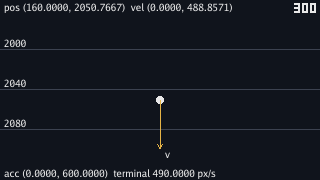
tick 300  pos (160.0000, 2050.7667)  vel (0.0000, 488.8571)
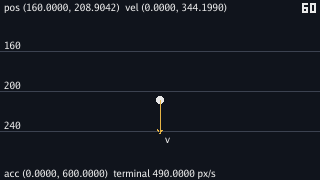
The line at tick 60 matches the interlude's 344.199. The position, 208.9042, is the sum of sixty velocity steps, each multiplied by one sixtieth of a second.
At tick 300, the speed is 488.8571. It is 1.14 pixels a second short of terminal
speed. The lab doesn't store 490; Terminal derives it from gravity,
drag and Dt.
The lab rebuilds acceleration from the keys every tick, with gravity first. A released key stops pushing on the next tick, and gravity can't be left out by accident.
The picture keeps the ball on one row and moves the world. A fixed camera would lose the ball almost at once. The ruling labels are world heights, so the top line can be checked against the line the ball is passing.
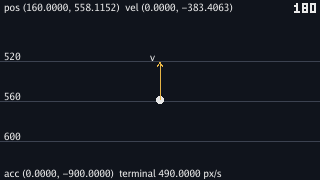
Hold Up for one second, from tick 121 to 180, and let go:
$ go run ./cmd/motion -lab ball
gravity 600.0000 px/s^2, drag 0.9800 a tick, one tick 0.0167 s: each tick adds 10.0000 px/s and keeps 0.9800 of the total
terminal speed 10.0000 x 0.9800 / 0.0200 = 490.0000 px/s, 8.1667 px a tick
tick 30  pos (160.0000, 63.1180)  vel (0.0000, 222.7127)
tick 60  pos (160.0000, 208.9042)  vel (0.0000, 344.1990)
tick 90  pos (160.0000, 399.7846)  vel (0.0000, 410.4678)
tick 120  pos (160.0000, 615.2632)  vel (0.0000, 446.6164)
tick 150  pos (160.0000, 686.3649)  vel (0.0000, -90.4468)
tick 180  pos (160.0000, 558.1152)  vel (0.0000, -383.4063)
tick 210  pos (160.0000, 478.9174)  vel (0.0000, 13.5706)
tick 240  pos (160.0000, 547.0726)  vel (0.0000, 230.1152)
tick 270  pos (160.0000, 695.6065)  vel (0.0000, 348.2369)
tick 300  pos (160.0000, 887.9858)  vel (0.0000, 412.6705)
The first four lines match the plain fall because nothing changed until tick 121. While Up is held, acceleration is 600 down and 1500 up, for 900 up. Each tick takes fifteen pixels a second off the downward speed before drag runs.
At tick 150, the ball is rising at 90 pixels a second, but it is still lower than it was at tick 120. The thrust first has to remove the downward speed already there. At tick 180, the ball is rising at 383 pixels a second. After release, gravity takes that upward speed away and the ball falls again.
SetTPS(60) tells Ebitengine to call Update sixty times
for every second of real time on average. If a frame takes too long to draw,
Ebitengine may call Update two or three times before the next draw to
catch up.
The motion code stays inside Update and uses the fixed Dt.
That keeps the arithmetic the same on machines that draw at different frame rates.
Go's wall clock is still available through time.Now; the lab keeps that
mistake behind a flag.
Comparing integrators
Add a second integrator that moves position before velocity. A flag runs the ball lab through that order. Another flag runs the worked wall-clock failure.
// internal/vec/motion.go — extend
// StepExplicit is the other order: the position takes the old velocity,
// and then the velocity takes the acceleration. It is kept so that it can
// be run beside Step.
func (b Body) StepExplicit(drag float64) Body {
	b.Pos = b.Pos.Add(b.Vel.Scale(Dt))
	b.Vel = b.Vel.Add(b.Acc.Scale(Dt)).Scale(drag)
	return b
}
// cmd/motion/ball.go — extend
import (
"flag"
"fmt"
"math"
"time"
"github.com/hajimehoshi/ebiten/v2"
"github.com/hajimehoshi/ebiten/v2/vector"
"gez/internal/vec"
)
// ballLab keeps the body and counts its ticks; the acceleration is rebuilt
// from the keys every tick, so a key that is released stops pushing at
// once and gravity is always there.
type ballLab struct {
tick int
body vec.Body
last time.Time // the wall clock at the last step, for -wall-clock only; the first step is a nominal tick
}
// step reads the keys into the acceleration, then integrates. Under
// -explicit the position moves before the velocity changes; under
// -wall-clock the step is as long as the time since the last one. Every
// thirtieth tick the lab prints where the ball is and how fast it moves.
func (l *ballLab) step(k keys) {
l.tick++
l.body.Acc = vec.Vec2{Y: gravity}
if k.up {
l.body.Acc.Y -= thrust
}
if k.left {
l.body.Acc.X -= sideways
}
if k.right {
l.body.Acc.X += sideways
}
switch {
case *wallClock:
now, dt := time.Now(), vec.Dt
if !l.last.IsZero() {
dt = now.Sub(l.last).Seconds()
}
l.body = vec.Integrate(l.body, drag, dt)
l.last = now
case *explicit:
l.body = l.body.StepExplicit(drag)
default:
l.body = l.body.Step(drag)
}
// The world is as wide as the screen and wraps.
l.body.Pos.X = math.Mod(l.body.Pos.X+screenW, screenW)
if l.tick%every == 0 {
fmt.Printf("tick %d pos %v vel %v\n", l.tick, l.body.Pos, l.body.Vel)
}
}
var (
explicit = flag.Bool("explicit", false, "step the ball lab position first, then velocity: the other order, kept so it can be run")
wallClock = flag.Bool("wall-clock", false, "step the ball lab by the time that has passed since the last step: the mistake, kept so it can be seen")
)go vet ./...
go run ./cmd/motion -lab ball -explicit$ go run ./cmd/motion -lab ball -explicit
gravity 600.0000 px/s^2, drag 0.9800 a tick, one tick 0.0167 s: each tick adds 10.0000 px/s and keeps 0.9800 of the total
terminal speed 10.0000 x 0.9800 / 0.0200 = 490.0000 px/s, 8.1667 px a tick
tick 30 pos (160.0000, 59.4061) vel (0.0000, 222.7127)
tick 60 pos (160.0000, 203.1675) vel (0.0000, 344.1990)
tick 90 pos (160.0000, 392.9435) vel (0.0000, 410.4678)
tick 120 pos (160.0000, 607.8196) vel (0.0000, 446.6164)
tick 150 pos (160.0000, 836.3875) vel (0.0000, 466.3349)
tick 180 pos (160.0000, 1072.4241) vel (0.0000, 477.0911)
tick 210 pos (160.0000, 1312.5347) vel (0.0000, 482.9584)
tick 240 pos (160.0000, 1554.8676) vel (0.0000, 486.1589)
tick 270 pos (160.0000, 1798.4127) vel (0.0000, 487.9047)
tick 300 pos (160.0000, 2042.6191) vel (0.0000, 488.8571)
The velocities match the semi-implicit run because the velocity line is the same. The positions lag by one tick of the current velocity. At tick 300, the gap is 8.1476 pixels, which is 488.8571 divided by sixty.
Explicit Euler draws the ball where it was one tick ago. On this falling ball, the difference is small. In springs and orbits, the explicit order adds energy, so the semi-implicit order is the one the package uses.
A common mistake is to make each step as long as the time since the last update.
The lab keeps that mistake behind -wall-clock. In that mode,
step reads time.Now and passes the elapsed seconds to
Integrate.
Run the five-second fall twice, in a window, with no keys held. These two runs were measured on the machine that made this page's pictures, and yours will differ. After the two startup lines, run one printed:
$ go run ./cmd/motion -lab ball -wall-clock
tick 30  pos (160.0000, 89.5636)  vel (0.0000, 251.5948)
tick 60  pos (160.0000, 245.6991)  vel (0.0000, 359.5221)
tick 90  pos (160.0000, 442.6307)  vel (0.0000, 419.0036)
tick 120  pos (160.0000, 661.4625)  vel (0.0000, 451.3960)
tick 150  pos (160.0000, 892.1686)  vel (0.0000, 469.1748)
tick 180  pos (160.0000, 1129.2347)  vel (0.0000, 478.5846)
tick 210  pos (160.0000, 1370.1212)  vel (0.0000, 484.0412)
tick 240  pos (160.0000, 1612.3158)  vel (0.0000, 486.3145)
tick 270  pos (160.0000, 1856.4739)  vel (0.0000, 488.4328)
tick 300  pos (160.0000, 2100.7619)  vel (0.0000, 489.2348)
and run two ended:
$ go run ./cmd/motion -lab ball -wall-clock
tick 270  pos (160.0000, 1856.5722)  vel (0.0000, 488.1775)
tick 300  pos (160.0000, 2100.6394)  vel (0.0000, 488.7111)
The fixed tick puts the ball at 2050.7667 after three hundred ticks every time. The wall clock put it at 2100.7619 once and 2100.6394 the next time. Both are about fifty pixels farther down than the fixed tick, and the two runs don't match each other.
Ebitengine calls Update sixty times a second on average, not at evenly
spaced moments. If a draw is slow, the library catches up with extra
Update calls. One wall-clock step then sees a long gap and another sees
a short gap. The total time may still be close to five seconds, but the arithmetic
doesn't land in the same place.
The fix is the default. Use Dt for the step length, and don't consult
the wall clock inside motion.
Using fixed ticks
Fixed ticks give the motion code the same inputs each run: the keys for this tick,
the body from the last tick and the constants in the program. Gravity adds
gravity × Dt. Drag keeps 0.98 of the velocity. Position moves by
vel × Dt.
The clock only decides when Ebitengine should call Update. If a machine
stalls, Ebitengine catches up by running more updates. Each update still advances one
fixed tick, so the ball lands at the same tick position.
This also makes game logic repeatable. The same starting state and the same keys on
the same ticks produce the same ball path. Body.Step keeps that property
as long as nothing inside the motion step reads the wall clock or some outside value.
Checkpoint
- Work three ticks of a fall from rest by hand under gravity 600 and drag 0.98, velocity first, and get 9.8, 19.404 and 28.8159 pixels a second.
- Derive 490 from 600 and 0.98 on paper, and say why the ball never reaches it and how much of the gap closes each tick.
- Write a lab whose keys touch only the acceleration, and say from the tick-150 line why a thrust that has reversed the velocity has not yet reversed the fall.
- Explain, from the tick-300 lines, why explicit Euler has the same velocities and positions one tick behind, and what that does under a spring.
- Read two wall-clock runs that landed at 2100.76 and 2100.64 back to gaps of
unequal length between calls to
Update. - Say what
SetTPS(60)promises, and what a program has to refrain from for the promise to make the same motion exact.
Exercise 1 — a jump you designed. A ball on a floor at height 600 that leaves the floor at a speed you choose when Space is pressed, and comes back down. Pick the speed so that the jump is two rulings high.
Keep the ball at or above 600 by clamping the position and zeroing the
velocity when it is on the floor, and on Space set Vel.Y to a
negative number: the key sets a velocity once, which is an impulse, and
gravity does the rest. With no drag the peak of a jump at speed v is
v² / (2 × 600) pixels; eighty pixels wants v = 310, and the drag
makes the real peak a little lower, so watch the rulings and adjust. The
number you settle on is a design decision the arithmetic can predict to within
the drag.
Exercise 2 — a heavier ball. Change the drag to 0.99 and predict the terminal speed before running. Then change gravity to 300 and predict again.
10 × 0.99 / 0.01 = 990 pixels a second: halving what the drag takes doubles the terminal speed, and the ball takes twice as long to get within a per cent of it, because each tick now closes one per cent of the gap. With gravity 300 and drag 0.98 the terminal speed halves to 245 and the approach takes exactly as long as before, since the fraction closed per tick depends on the drag alone. The lab prints both numbers at its start.
Exercise 3 — a floor with a bounce. Put a floor at height 600 and make the ball bounce off it, keeping eight tenths of its speed each time. How many bounces until it is moving less than a pixel a tick?
After the step, if Pos.Y is past 600, set it to 600 and set
Vel.Y to -0.8 * Vel.Y. Each bounce keeps 0.8 of the
speed, so after n bounces the speed is 0.8n of the first landing's,
and with the ball landing at about 440 pixels a second it takes nine
bounces to get under sixty pixels a second, one pixel a tick; count them on
the printed lines, and watch the bounces get shorter and closer
together as the geometric series runs out.