Text and the HUD
Drawing text
This chapter draws a score and a pause message. The score uses the sprite sheet's block digits. The words use Go Regular, a TrueType font carried inside the program.
A number's width comes from its digit count. A word's width comes from the font. In both cases, centring means subtracting half the width from the middle column and drawing at a whole-pixel left edge. The pause overlay then shows the draw-order rule: later calls paint over earlier calls.
Drawing sheet digits
Put the digit font in internal/digits. Go allows only code inside the
gez module to import an internal package, so the package is
private to this project. It loads the sheet and cuts the ten glyphs out of row 24.
// internal/digits/digits.go — create
// Package digits draws numbers with the sprite sheet's digit font: ten
// glyphs, three pixels wide and five tall, on row 24 of the sheet. Every
// game in this volume draws its score with it.
package digits

import (
	"image"
	"image/png"
	"os"

	"github.com/hajimehoshi/ebiten/v2"
)

// Font is the ten digits, cut from the sheet.
type Font struct {
	glyph [10]*ebiten.Image
}

// The glyphs' size on the sheet, and the gap between two digits, in the
// sheet's pixels; a scale multiplies all three.
const (
	GlyphW = 3
	GlyphH = 5
	Gap    = 1
)

// Load reads the sheet at path and cuts the ten digits out of it.
func Load(path string) (*Font, error) {
	f, err := os.Open(path)
	if err != nil {
		return nil, err
	}
	defer f.Close()
	img, err := png.Decode(f)
	if err != nil {
		return nil, err
	}
	sheet := ebiten.NewImageFromImage(img)
	var font Font
	for i := range font.glyph {
		r := image.Rect(GlyphW*i, 24, GlyphW*i+GlyphW, 24+GlyphH)
		font.glyph[i] = sheet.SubImage(r).(*ebiten.Image)
	}
	return &font, nil
}

// Width is how many pixels wide n is when drawn at scale.
func Width(n, scale int) int {
	count := 1
	for n >= 10 {
		n /= 10
		count++
	}
	return scale * (count*GlyphW + (count-1)*Gap)
}

// Draw draws n at scale with its left edge on column x and its top on row y.
func (f *Font) Draw(dst *ebiten.Image, n int, x, y float64, scale int) {
	var glyphs []int
	for n >= 10 {
		glyphs = append([]int{n % 10}, glyphs...)
		n /= 10
	}
	glyphs = append([]int{n}, glyphs...)
	step := float64(scale * (GlyphW + Gap))
	for i, d := range glyphs {
		op := &ebiten.DrawImageOptions{}
		op.GeoM.Scale(float64(scale), float64(scale))
		op.GeoM.Translate(x+float64(i)*step, y)
		dst.DrawImage(f.glyph[d], op)
	}
}

// DrawCentred draws n at scale with its middle on column x and its top on
// row y, rounding the left edge down to a whole pixel.
func (f *Font) DrawCentred(dst *ebiten.Image, n int, x, y float64, scale int) {
	left := float64(int(x) - Width(n, scale)/2)
	f.Draw(dst, n, left, y, scale)
}
// cmd/score/main.go — create
package main
import (
"image/color"
"log"
"github.com/hajimehoshi/ebiten/v2"
"gez/internal/digits"
)
const (
screenW = 320
screenH = 180
)
var (
courtColor = color.RGBA{R: 16, G: 20, B: 28, A: 255}
lineColor = color.RGBA{R: 232, G: 232, B: 232, A: 255}
)
type Game struct {
font *digits.Font
left int // the two scores on show
right int
}
func (g *Game) Update() error {
return nil
}
// drawScore draws the two numbers with the sheet's digits at four times,
// centred on the middle of each half of the court.
func (g *Game) drawScore(screen *ebiten.Image) {
screen.Fill(courtColor)
g.font.DrawCentred(screen, g.left, 80, 40, 4)
g.font.DrawCentred(screen, g.right, 240, 40, 4)
}
func (g *Game) Draw(screen *ebiten.Image) {
g.drawScore(screen)
}
func (g *Game) Layout(outsideWidth, outsideHeight int) (int, int) {
return screenW, screenH
}
func main() {
ebiten.SetWindowSize(960, 540)
ebiten.SetWindowTitle("Score")
ebiten.SetTPS(60)
font, err := digits.Load("assets/pong-sheet.png")
if err != nil {
log.Fatal(err)
}
g := &Game{font: font, left: 3, right: 12}
if err := ebiten.RunGame(g); err != nil {
log.Fatal(err)
}
}go vet ./...
go run ./cmd/score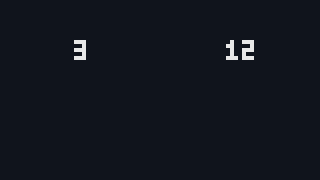
Draw splits the number from the right. For 12, the remainder gives 2,
then the next division leaves 1. The code prepends each digit so they draw in
reading order.
Each glyph is drawn by scaling and then moving, the same GeoM order
used for images. At four times scale, one digit takes twelve pixels and the gap
takes four, so the next digit starts sixteen pixels to the right.
Width counts digits and applies the same arithmetic as the Math
Interlude. DrawCentred subtracts half the width from the middle and
rounds to a whole pixel. 0 is one glyph wide because a score of zero
still needs to show one digit.
A number with two digits at four times is two glyphs of 3 × 4 = 12 pixels
with one gap of 1 × 4 = 4 between them: 12 + 4 + 12 = 28 pixels wide.
Three digits are 12 + 4 + 12 + 4 + 12 = 44, and one digit is 12: the gaps are one
fewer than the digits. As a formula, for n digits at scale
s, the width is s × (3n +
(n − 1)). Centred on column 240, the 12 has its left edge
at 240 − 28 ÷ 2 = 226 and its right edge at 254.
Drawing TrueType text
Go Regular is the font published by the Go project. The package
golang.org/x/image/font/gofont/goregular stores the TrueType file in a
byte slice named TTF. Importing it puts the font bytes in the program.
Add the module before extending cmd/score.
// cmd/score/main.go — extend
import (
"bytes"
"image/color"
"log"
"math"
"github.com/hajimehoshi/ebiten/v2"
"github.com/hajimehoshi/ebiten/v2/text/v2"
"golang.org/x/image/font/gofont/goregular"
"gez/internal/digits"
)
type Game struct {
font *digits.Font
face *text.GoTextFace
left int // the two scores on show
right int
}
func (g *Game) Draw(screen *ebiten.Image) {
g.drawScore(screen)
g.drawWords(screen)
}
func main() {
ebiten.SetWindowSize(960, 540)
ebiten.SetWindowTitle("Score")
ebiten.SetTPS(60)
font, err := digits.Load("assets/pong-sheet.png")
if err != nil {
log.Fatal(err)
}
g := &Game{font: font, face: newFace(12), left: 3, right: 12}
if err := ebiten.RunGame(g); err != nil {
log.Fatal(err)
}
}
// newFace parses the Go Regular font, which ships inside the program as a
// Go package, and returns it at the size asked for, in pixels.
func newFace(size float64) *text.GoTextFace {
src, err := text.NewGoTextFaceSource(bytes.NewReader(goregular.TTF))
if err != nil {
log.Fatal(err)
}
return &text.GoTextFace{Source: src, Size: size}
}
// drawText draws s in the line colour with its left edge on column x and
// its top on row y.
func drawText(dst *ebiten.Image, s string, face *text.GoTextFace, x, y float64) {
op := &text.DrawOptions{}
op.GeoM.Translate(x, y)
op.ColorScale.ScaleWithColor(lineColor)
text.Draw(dst, s, face, op)
}
// drawCentred draws s with its middle on column x: the string is measured
// and the left edge is half its width to the left, rounded down to a pixel.
func drawCentred(dst *ebiten.Image, s string, face *text.GoTextFace, x, y float64) {
w, _ := text.Measure(s, face, 0)
drawText(dst, s, face, math.Floor(x-w/2), y)
}
// drawWords draws the title and a line of small text under each number.
func (g *Game) drawWords(screen *ebiten.Image) {
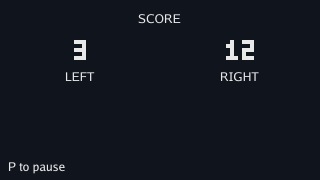
drawCentred(screen, "SCORE", g.face, screenW/2, 12)
drawCentred(screen, "LEFT", g.face, 80, 70)
drawCentred(screen, "RIGHT", g.face, 240, 70)
drawText(screen, "P to pause", g.face, 8, 160)
}go get golang.org/x/image@v0.43.0
go mod tidy
go mod vendor
cat go.mod
go vet ./...
go run ./cmd/score$ go get golang.org/x/image@v0.43.0 $ go mod tidy $ go mod vendor $ cat go.mod module gez go 1.26 require ( github.com/hajimehoshi/ebiten/v2 v2.9.11 golang.org/x/image v0.43.0 ) require ( github.com/ebitengine/gomobile v0.0.0-20250923094054-ea854a63cce1 // indirect github.com/ebitengine/hideconsole v1.0.0 // indirect github.com/ebitengine/purego v0.9.0 // indirect github.com/go-text/typesetting v0.3.0 // indirect github.com/jezek/xgb v1.1.1 // indirect github.com/rivo/uniseg v0.4.7 // indirect golang.org/x/sync v0.21.0 // indirect golang.org/x/sys v0.44.0 // indirect golang.org/x/text v0.38.0 // indirect ) $ go vet ./...
go get prints nothing here because golang.org/x/image
was already in the build list through Ebitengine's own tests. The command still
writes it into go.mod as a direct requirement. go mod tidy
finds the modules needed by the text package, and go mod vendor
copies them into vendor.
newFace parses the font once in main.
text.GoTextFace pairs the parsed font with a size in pixels.
text.Draw, from Ebitengine's text package, takes draw options with a
GeoM for position and a colour scale for the glyphs.
The TrueType words have soft edges because a curve crosses partial pixels. The sheet digits keep hard edges because they are tiny images drawn at an integer scale. Use the sheet for scores and the font for words.
text.Measure returns the width and height of a string in this face.
drawCentred subtracts half the width and uses
math.Floor so the glyphs start on a whole pixel.
Drawing an overlay
// cmd/score/main.go — extend
import (
	"bytes"
	"image/color"
	"log"
	"math"

	"github.com/hajimehoshi/ebiten/v2"
	"github.com/hajimehoshi/ebiten/v2/inpututil"
	"github.com/hajimehoshi/ebiten/v2/text/v2"
	"github.com/hajimehoshi/ebiten/v2/vector"
	"golang.org/x/image/font/gofont/goregular"

	"gez/internal/digits"
)

var (
	courtColor = color.RGBA{R: 16, G: 20, B: 28, A: 255}
	lineColor  = color.RGBA{R: 232, G: 232, B: 232, A: 255}
	shadeColor = color.RGBA{R: 0, G: 0, B: 0, A: 160}
)

type Game struct {
	font   *digits.Font
	face   *text.GoTextFace
	left   int // the two scores on show
	right  int
	paused bool
}

func (g *Game) Update() error {
	if inpututil.IsKeyJustPressed(ebiten.KeyP) {
		g.paused = !g.paused
	}
	return nil
}

func (g *Game) Draw(screen *ebiten.Image) {
	g.drawScore(screen)
	g.drawWords(screen)
	g.drawPause(screen)
}

// drawPause darkens everything drawn so far and writes over it.
func (g *Game) drawPause(screen *ebiten.Image) {
	if !g.paused {
		return
	}
	vector.FillRect(screen, 0, 0, screenW, screenH, shadeColor, false)
	drawCentred(screen, "PAUSED", g.face, screenW/2, 84)
}
go vet ./...
go run ./cmd/score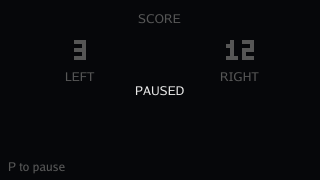
Press P and the court dims. Press P again and the picture comes back. The toggle
uses IsKeyJustPressed so a held P changes the flag once.
The shade is one rectangle the size of the picture. Its alpha is 160 out of 255, so it covers about 63 percent of what is under it. The line colour at 232 comes out near 86 after the shade, dim but still visible.
A translucent colour blends with the pixel already on the screen. The word is drawn after the shade, so it stays at full brightness.
Swap the two lines in drawPause, writing the word first and shading
after:
func (g *Game) drawPause(screen *ebiten.Image) {
	if !g.paused {
		return
	}
	drawCentred(screen, "PAUSED", g.face, screenW/2, 84)
	vector.FillRect(screen, 0, 0, screenW, screenH, shadeColor, false)
}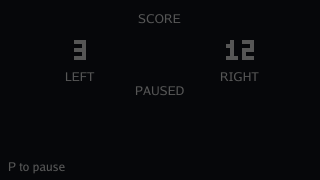
The word is there, but it is as dim as the numbers. The shade darkens whatever the pixels hold when it is drawn, and the word was already in those pixels.
screen is one image. Each call paints over what is already there.
There is no separate layer called "top"; the order of the calls creates the order
you see. Put the shade back before the word.
Ordering draw calls
Draw paints into one image. The fill at the top gives each picture a
fresh background. Opaque colours replace pixels; translucent colours mix with the
pixels already there.
Read Draw from back to front: background first, game objects after that,
then scores, then overlays. If two things overlap, the later call is the one you see
on top.
Checkpoint
- Cut a ten-glyph digit font from the sheet into a package every game can import, and draw any number with it at any scale.
- Work out the width of a number in the digit font by hand, and centre it on a column in whole pixels.
- Add
golang.org/x/imageto the module, and say whygo getprinted nothing and whatgo mod tidyadded. - Parse Go Regular from the bytes inside the program, make a face at a size, draw a string in the line colour, and centre it by measuring it.
- Draw a translucent shade and say, from the alpha, how bright the digits under it come out.
- Explain from the order of two calls why a word drawn before a shade is dim,
and read any
Drawas a back-to-front list.
Exercise 1 — a score that climbs. Make the left score go up by one every sixty ticks, and watch what happens to the digits when it reaches 10 and 100.
A tick counter in Update, and g.left++ when it hits a
multiple of sixty. At 10 the number gets a second glyph and its left edge moves
eight pixels left, because DrawCentred re-centres it; at 100 it
moves eight more. The right edge moves the same amount right. A scoreboard that
kept its left edge fixed would drift toward the middle instead.
Exercise 2 — the height the face reports. Print the
width and height text.Measure returns for "SCORE" at 12, then at 24,
and compare them with the pixels on screen.
Add a fmt.Println of the two values in main; at 12 the
height is the face's line height, a little more than twelve, and the width is
near 40; at 24 both double. The height is the room a line needs, not the height
of the capitals, which is why the words are placed by their top and the number
under them by a row chosen by eye.
Exercise 3 — a lighter shade. Change the shade's alpha to 60, then 250, and say what PAUSED looks like on each.
At 60 the court is barely dimmed, to about three quarters, and the word sits on a picture that still reads as the game; at 250 the court is nearly black and the word floats alone. 160 is a choice between the two, made so that a player can see the state they paused in.