The Game State Machine
One state runs at a time
The platformer now has a menu, a playing screen, a pause screen and an over screen. One of them owns input on each tick. A state machine stores that one state and lets it return the state that should run next.
The game already has a world and a camera. The machine wraps that world instead of replacing it. Pause keeps the live play state, so resuming returns to the same tick and the same player position.
The input edges
Extend internal/platform/physics.go. The held keys stay in
Input. The machine compares the current input with the previous tick and
fills the pressed fields for state changes and jumping.
type Input struct {
	Left, Right  bool
	JumpHeld     bool
	JumpPressed  bool
	JumpReleased bool
	Start        bool
	Pause        bool
	Quit         bool
	Lose         bool
}

type World struct {
	Player     Player
	Camera     Camera
	Tick       int
	FloorY     float64
	LedgeRight float64
	MaxFall    float64
}
Space is both Start and JumpHeld in the window. The machine
records the previous tick, so holding Space from the menu into play does not count as
a fresh jump press.
The state types
Create internal/platform/state.go. This package still imports no Ebitengine
code. A state updates rules, names itself for tests, and exposes its world when drawing
needs one.
package platform

import (
	"fmt"
	"strings"
)

type State interface {
	Update(in, pressed Input) State
	Name() string
	World() *World
}

type Machine struct {
	current State
	last    Input
}

func NewMachine() *Machine {
	m := &Machine{}
	m.Switch(&Menu{})
	return m
}

func (m *Machine) State() State {
	return m.current
}

func (m *Machine) Name() string {
	if m.current == nil {
		return "none"
	}
	return m.current.Name()
}

func (m *Machine) Switch(next State) {
	m.current = next
}

func (m *Machine) Update(in Input) {
	pressed := in.Pressed(m.last)
	if m.current != nil {
		m.current = m.current.Update(in, pressed)
	}
	m.last = in
}

type Menu struct{}

func (s *Menu) Update(in, pressed Input) State {
	if pressed.Start {
		return NewPlay()
	}
	return s
}

func (s *Menu) Name() string  { return "menu" }
func (s *Menu) World() *World { return nil }

type Play struct {
	W *World
}

func NewPlay() *Play {
	return &Play{W: NewWorld()}
}

func (s *Play) Update(in, pressed Input) State {
	if pressed.Pause {
		return &Pause{Play: s}
	}
	if pressed.Lose {
		return &Over{}
	}
	move := in
	move.JumpPressed = pressed.JumpPressed
	move.JumpReleased = pressed.JumpReleased
	s.W.Step(move)
	s.W.StepCamera(FollowFactor, true)
	return s
}

func (s *Play) Name() string  { return "play" }
func (s *Play) World() *World { return s.W }

type Pause struct {
	Play *Play
}

func (s *Pause) Update(in, pressed Input) State {
	if pressed.Pause {
		return s.Play
	}
	if pressed.Quit {
		return &Menu{}
	}
	return s
}

func (s *Pause) Name() string  { return "pause" }
func (s *Pause) World() *World { return s.Play.World() }

type Over struct{}

func (s *Over) Update(in, pressed Input) State {
	if pressed.Start {
		return &Menu{}
	}
	return s
}

func (s *Over) Name() string  { return "over" }
func (s *Over) World() *World { return nil }

func (in Input) Pressed(last Input) Input {
	pressed := Input{}
	pressed.JumpPressed = in.JumpHeld && !last.JumpHeld
	pressed.JumpReleased = !in.JumpHeld && last.JumpHeld
	pressed.Start = in.Start && !last.Start
	pressed.Pause = in.Pause && !last.Pause
	pressed.Quit = in.Quit && !last.Quit
	pressed.Lose = in.Lose && !last.Lose
	return pressed
}

func StateTransitionReport() string {
	m := NewMachine()
	var names []string
	names = append(names, m.Name())
	tap(m, Input{Start: true, JumpHeld: true})
	names = append(names, m.Name())
	tap(m, Input{Pause: true})
	names = append(names, m.Name())
	tap(m, Input{Pause: true})
	names = append(names, m.Name())
	tap(m, Input{Lose: true})
	names = append(names, m.Name())
	tap(m, Input{Start: true})
	names = append(names, m.Name())
	return "states: " + strings.Join(names, " -> ")
}

func HeldStartReport() string {
	m := NewMachine()
	m.Update(Input{Start: true, JumpHeld: true})
	play, _ := m.State().(*Play)
	m.Update(Input{Start: true, JumpHeld: true})
	return fmt.Sprintf("held Space across menu: state %s; play tick %d; jumps %d", m.Name(), play.W.Tick, play.W.Player.Jumps)
}

func PauseFreezeReport() string {
	m := NewMachine()
	tap(m, Input{Start: true})
	for i := 0; i < 30; i++ {
		m.Update(Input{Right: true})
	}
	play := m.State().(*Play)
	before := play.W.Tick
	tap(m, Input{Pause: true})
	for i := 0; i < 30; i++ {
		m.Update(Input{Right: true})
	}
	after := m.State().World().Tick
	tap(m, Input{Pause: true})
	return fmt.Sprintf("pause at tick %d; after 30 paused updates tick %d; resumed %s", before, after, m.Name())
}

func PauseStepsFailureReport() string {
	good := NewMachine()
	tap(good, Input{Start: true})
	for i := 0; i < 30; i++ {
		good.Update(Input{Right: true})
	}
	tap(good, Input{Pause: true})
	for i := 0; i < 30; i++ {
		good.Update(Input{Right: true})
	}
	goodTick := good.State().World().Tick

	bad := NewWorld()
	for i := 0; i < 30; i++ {
		bad.Step(Input{Right: true})
	}
	for i := 0; i < 30; i++ {
		bad.Step(Input{Right: true})
	}
	return fmt.Sprintf("correct pause tick %d; broken pause tick %d", goodTick, bad.Tick)
}

func tap(m *Machine, in Input) {
	m.Update(in)
	m.Update(Input{})
}
go run ./cmd/platformer -play state-flow$ go run ./cmd/platformer -play state-flow
states: menu -> play -> pause -> play -> over -> menu
Update returns the next state. Most ticks return the same pointer.
Menu returns a new Play. Pause returns the same Play pointer it
stored. Over returns Menu when Space is pressed again.
Held keys do not cross states
A held key can outlive the state that first read it. The machine prevents one Space hold from starting the game and jumping on the first play tick. It derives pressed edges from the previous tick after the state update finishes.
go run ./cmd/platformer -play held-start$ go run ./cmd/platformer -play held-start
held Space across menu: state play; play tick 1; jumps 0
The play state advances one tick because the game has started. It does not jump.
JumpHeld is true, but JumpPressed is false because Space was
already down on the menu tick.
Pause keeps the play world frozen
Pause stores *Play, not a copy of the world. Its update reads Escape and Q
only. It does not step physics, so the player and camera stay exactly where play left
them.
go run ./cmd/platformer -play pause-freeze$ go run ./cmd/platformer -play pause-freeze
pause at tick 31; after 30 paused updates tick 31; resumed play
The run gives the paused machine thirty updates with Right held. The world's tick is still 31. Escape returns to the saved play state, so the same world resumes instead of a new one starting.
The window draws each state
Replace cmd/platformer/main.go. Ebitengine still calls one Game. That Game
forwards input to the machine, then draws by checking the current state type.
package main

import (
	"flag"
	"fmt"
	"image/color"
	"log"

	"github.com/hajimehoshi/ebiten/v2"
	"github.com/hajimehoshi/ebiten/v2/vector"

	"gez/internal/platform"
	"gez/internal/vec"
)

const (
	screenW = 320
	screenH = 180
)

var play = flag.String("play", "", "print one platformer run and exit")
var trace = flag.Bool("trace", false, "print the camera position every thirty ticks")
var follow = flag.Float64("follow", platform.FollowFactor, "fraction of the remaining distance the camera closes each tick")
var noClamp = flag.Bool("no-clamp", false, "let the camera show outside the world rectangle")

type Game struct {
	machine *platform.Machine
}

func (g *Game) Update() error {
	in := platform.Input{
		Left:     ebiten.IsKeyPressed(ebiten.KeyArrowLeft) || ebiten.IsKeyPressed(ebiten.KeyA),
		Right:    ebiten.IsKeyPressed(ebiten.KeyArrowRight) || ebiten.IsKeyPressed(ebiten.KeyD),
		JumpHeld: ebiten.IsKeyPressed(ebiten.KeySpace),
		Start:    ebiten.IsKeyPressed(ebiten.KeySpace),
		Pause:    ebiten.IsKeyPressed(ebiten.KeyEscape),
		Quit:     ebiten.IsKeyPressed(ebiten.KeyQ),
		Lose:     ebiten.IsKeyPressed(ebiten.KeyK),
	}
	g.machine.Update(in)
	if *trace {
		if w := g.machine.State().World(); w != nil && w.Tick%30 == 0 {
			p := w.Player
			sx, sy := w.Camera.ToScreen(platformPlayerPos(p))
			fmt.Printf("tick %d player (%.0f, %.0f) camera (%.4f, %.4f) screen (%d, %d)\n", w.Tick, p.X, p.Y, w.Camera.X, w.Camera.Y, sx, sy)
		}
	}
	return nil
}

func (g *Game) Draw(screen *ebiten.Image) {
	drawState(screen, g.machine.State())
}

func (g *Game) Layout(outsideWidth, outsideHeight int) (int, int) {
	return screenW, screenH
}

func drawState(screen *ebiten.Image, state platform.State) {
	switch s := state.(type) {
	case *platform.Menu:
		drawMenu(screen)
	case *platform.Play:
		drawWorld(screen, s.World())
	case *platform.Pause:
		drawWorld(screen, s.World())
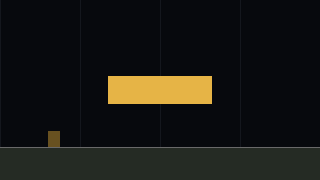
		vector.FillRect(screen, 0, 0, screenW, screenH, color.RGBA{R: 0, G: 0, B: 0, A: 140}, false)
		vector.FillRect(screen, 108, 76, 104, 28, color.RGBA{R: 230, G: 180, B: 70, A: 255}, false)
	case *platform.Over:
		drawOver(screen)
	default:
		screen.Fill(color.RGBA{R: 16, G: 20, B: 28, A: 255})
	}
}

func drawMenu(screen *ebiten.Image) {
	screen.Fill(color.RGBA{R: 16, G: 20, B: 28, A: 255})
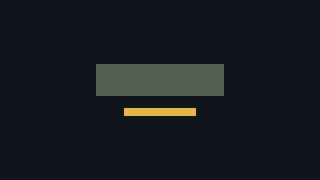
	vector.FillRect(screen, 96, 64, 128, 32, color.RGBA{R: 82, G: 96, B: 80, A: 255}, false)
	vector.FillRect(screen, 124, 108, 72, 8, color.RGBA{R: 230, G: 180, B: 70, A: 255}, false)
}

func drawOver(screen *ebiten.Image) {
	screen.Fill(color.RGBA{R: 16, G: 20, B: 28, A: 255})
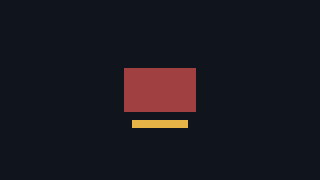
	vector.FillRect(screen, 124, 68, 72, 44, color.RGBA{R: 160, G: 64, B: 64, A: 255}, false)
	vector.FillRect(screen, 132, 120, 56, 8, color.RGBA{R: 230, G: 180, B: 70, A: 255}, false)
}

func drawWorld(screen *ebiten.Image, w *platform.World) {
	screen.Fill(color.RGBA{R: 16, G: 20, B: 28, A: 255})
	for x := 0.0; x <= platform.WorldW; x += 80 {
		drawWorldLine(screen, w.Camera, x, 0, x, platform.WorldH, color.RGBA{R: 45, G: 52, B: 64, A: 255})
	}
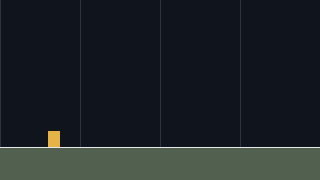
	drawWorldRect(screen, w.Camera, 0, platform.FloorY, platform.WorldW, platform.WorldH-platform.FloorY, color.RGBA{R: 82, G: 96, B: 80, A: 255})
	p := w.Player
	drawWorldRect(screen, w.Camera, p.X, p.Y, platform.PlayerW, platform.PlayerH, color.RGBA{R: 230, G: 180, B: 70, A: 255})
	drawWorldLine(screen, w.Camera, 0, platform.FloorY, platform.WorldW, platform.FloorY, color.RGBA{R: 232, G: 232, B: 232, A: 255})
}

func platformPlayerPos(p platform.Player) vec.Vec2 {
	return vec.Vec2{X: p.X, Y: p.Y}
}

func drawWorldRect(screen *ebiten.Image, cam platform.Camera, x, y, w, h float64, c color.Color) {
	sx, sy := cam.ToScreen(vec.Vec2{X: x, Y: y})
	vector.FillRect(screen, float32(sx), float32(sy), float32(w), float32(h), c, false)
}

func drawWorldLine(screen *ebiten.Image, cam platform.Camera, x0, y0, x1, y1 float64, c color.Color) {
	sx0, sy0 := cam.ToScreen(vec.Vec2{X: x0, Y: y0})
	sx1, sy1 := cam.ToScreen(vec.Vec2{X: x1, Y: y1})
	vector.StrokeLine(screen, float32(sx0), float32(sy0), float32(sx1), float32(sy1), 1, c, false)
}

func printPlay(name string) error {
	switch name {
	case "state-flow":
		fmt.Println(platform.StateTransitionReport())
	case "held-start":
		fmt.Println(platform.HeldStartReport())
	case "pause-freeze":
		fmt.Println(platform.PauseFreezeReport())
	case "pause-steps":
		fmt.Println(platform.PauseStepsFailureReport())
	case "camera-transform":
		fmt.Println(platform.CameraTransformReport())
	case "camera-follow":
		fmt.Println(platform.CameraFollowReport(*follow))
	case "camera-trace":
		fmt.Println(platform.CameraTraceReport(*follow, !*noClamp))
	case "camera-clamp":
		fmt.Println(platform.CameraClampReport(*follow, !*noClamp))
	case "camera-raw":
		fmt.Println(platform.CameraRawDrawReport())
	case "apex":
		fmt.Println(platform.ApexReport())
	case "jump-cut":
		fmt.Println(platform.JumpCutReport())
	case "coyote":
		fmt.Println(platform.CoyoteReport(0))
	case "buffer":
		fmt.Println(platform.BufferReport(4))
	case "cap":
		fmt.Println(platform.FallCapReport())
	case "bool":
		fmt.Println(platform.BoolFailureReport())
	case "":
		return nil
	default:
		return fmt.Errorf("no play run called %q", name)
	}
	return ebiten.Termination
}

func main() {
	flag.Parse()
	if *play != "" {
		if err := printPlay(*play); err != nil && err != ebiten.Termination {
			log.Fatal(err)
		}
		return
	}
	ebiten.SetWindowSize(960, 540)
	ebiten.SetWindowTitle("Platformer")
	ebiten.SetTPS(60)
	if err := ebiten.RunGame(&Game{machine: platform.NewMachine()}); err != nil {
		log.Fatal(err)
	}
}
Drawing stays outside internal/platform because drawing uses Ebitengine.
The platform package keeps the rules. Pause draws the play world first, then places a
dark layer and a small marker over it.
Pause must not step the world
Put the pause flag around drawing only, and keep stepping the world in the shared update path. Run the failure print after thirty play ticks and thirty paused ticks:
go run ./cmd/platformer -play pause-steps$ go run ./cmd/platformer -play pause-steps
correct pause tick 31; broken pause tick 60
The symptom is a moving world under a paused picture. The broken version still calls
World.Step while the pause screen is active. The fix is the state machine:
only Play.Update steps physics, and Pause.Update never calls it.
What the machine and states can now answer
- Store exactly one current state in
Machine. - Return the next state from
Updateinstead of setting several mode booleans. - Keep one Space hold from becoming both a menu start and a play jump.
- Pause and resume the same
Playpointer without advancing its world. - Draw Menu, Play, Pause and Over from a type switch in
cmd/platformer.
Exercise 1 · start on Enter. Add an Enter field to Input and let Menu start from Space or Enter.
Read ebiten.KeyEnter in main.go. Add the pressed-edge line in Input.Pressed. Run go run ./cmd/platformer and start the game with Enter.
Exercise 2 · pause counter. Add an integer to Pause that counts paused updates, and draw a wider overlay marker after sixty paused ticks.
The counter belongs to Pause, not Play. Run the window, press Escape, wait a second, and check that the world is still frozen while the pause marker changes.
Exercise 3 · restart from Over. Change Over.Update so Space returns directly to a fresh Play.
Return NewPlay() instead of &Menu{{}}. Run go run ./cmd/platformer, press Space, press K, then press Space again. The world starts at the beginning of a new play state.