A Vector Is a Direction
Vectors as positions and directions
This chapter adds a Vec2 type and an arrows lab. The lab starts with
the vector (3, 4), draws it from one origin and prints the numbers made by its
vector operations.
A vector is a pair of numbers. The pair can mean a position, such as three units right and four units down. It can also mean a direction and a length, such as five units along the arrow from the origin to that point.
Every Vec2 method takes its receiver by value and returns a new vector.
Adding vectors makes a third vector and leaves both inputs unchanged. That matches
the way arithmetic works: a sum does not edit the numbers that made it.
Vector operations
Two vectors, a = (3, 4) and b = (3, 1). Adding them adds the coordinates: a + b = (6, 5), the place you reach by walking a and then b, in either order. Subtracting them subtracts the coordinates: a − b = (0, 3), the walk from b's tip to a's tip, which is the vector that answers "which way is a from b". Scaling multiplies both coordinates by one number: 2a = (6, 8), the same direction, twice as far; −a points the opposite way. The length of a is Pythagoras, the square root of 3² + 4², which is 5; b's length is the square root of 10, 3.1623.
Normalising is scaling by one over the length: a divided by 5 is (0.6, 0.8), a vector of length one that points where a points. It is a's direction with the distance taken out, which is what a thing that needs "that way, at my own speed" wants: a ship's thrust is the ship's normalised heading times the engine's push. The zero vector has no direction, and one over its length is one over zero; the operation is defined to give the zero vector back, and the chapter's worked failure is what the program does without that definition.
A quarter turn needs no trigonometry. The vector (−y, x) is at right angles to (x, y) and the same length: for a, that is (−4, 3). Chapter 11's exercise found the same swap on the circle of radius one, and here it is a rule for any length. The last operation takes two vectors and gives one number: the dot product is the sum of the products of the coordinates, a · b = 3×3 + 4×1 = 13. That number is also the length of a times the length of b times the cosine of the angle between them, so 13 divided by 5 and by 3.1623 is 0.8222, and the angle whose cosine that is, 34.6952 degrees, is the angle between a and b. Divided by a's length alone, 13 / 5 = 2.6, it is the length of b's shadow on a's line: how far along a you get if you walk b and only count the part that went a's way. A dot product of zero means the two are at right angles, and a negative one means they point more apart than together.
// internal/vec/vec2.go — create
package vec

import (
	"fmt"
	"math"
)

// Vec2 is a pair of numbers used two ways: as a position, where something
// is, and as a direction, which way and how far. The same operations
// serve both. A Vec2 is a value: every method takes its receiver by value
// and returns a new Vec2, so a.Add(b) leaves a as it was, and no call on a
// vector can change a vector held somewhere else.
type Vec2 struct {
	X, Y float64
}

// String prints the pair to four decimal places.
func (a Vec2) String() string {
	return fmt.Sprintf("(%.4f, %.4f)", a.X, a.Y)
}

// Add is the vector sum: each coordinate added.
func (a Vec2) Add(b Vec2) Vec2 {
	return Vec2{a.X + b.X, a.Y + b.Y}
}

// Sub is the difference a − b: the vector that takes b to a.
func (a Vec2) Sub(b Vec2) Vec2 {
	return Vec2{a.X - b.X, a.Y - b.Y}
}

// Scale multiplies both coordinates by s: the same direction, s times as
// long, or the opposite direction for a negative s.
func (a Vec2) Scale(s float64) Vec2 {
	return Vec2{a.X * s, a.Y * s}
}

// Len is the vector's length, the distance from the origin to its tip.
func (a Vec2) Len() float64 {
	return math.Hypot(a.X, a.Y)
}

// Norm is the vector scaled to length one: the direction with the length
// taken out. The zero vector has no direction, and normalising it returns
// the zero vector rather than dividing by zero.
func (a Vec2) Norm() Vec2 {
	l := a.Len()
	if l == 0 {
		return Vec2{}
	}
	return Vec2{a.X / l, a.Y / l}
}

// Perp is the vector turned a quarter turn in the positive direction: the
// coordinates swapped and one sign flipped, with no trigonometry.
func (a Vec2) Perp() Vec2 {
	return Vec2{-a.Y, a.X}
}

// Dot is the dot product: the sum of the products of the coordinates. It
// is the length of a times the length of b times the cosine of the angle
// between them, so it is positive when they point the same way, zero when
// they are at right angles, and negative when they point apart.
func (a Vec2) Dot(b Vec2) float64 {
	return a.X*b.X + a.Y*b.Y
}
go vet ./...
Every receiver is (a Vec2), with no star. Go copies the sixteen bytes
of the struct into the method. The method builds a new struct and returns it, so
the caller's vector stays unchanged.
String makes %v print a vector to four places. Every lab
line and every HUD line gets the same format. Len uses
math.Hypot, which is the standard-library distance function for two
coordinates. Norm has the one branch in the file: the guard that makes
the zero vector normalise to itself.
Drawing vector operations
Extend cmd/motion with an arrows lab. The lab stores two vectors in
pixels: a at (48, 64) and b at (48, 16). At
sixteen pixels a unit, those are (3, 4) and (3, 1).
Ebitengine still supplies the window, input and drawing calls. The lab uses the
vector package to decide what to draw. It draws a, b,
a+b, a-b, a turned a quarter turn and
a normalised.
// cmd/motion/arrows.go — create
package main

import (
	"fmt"
	"image/color"

	"github.com/hajimehoshi/ebiten/v2"
	"github.com/hajimehoshi/ebiten/v2/vector"

	"gez/internal/vec"
)

// The arrows lab draws two vectors from one origin, a under the arrow keys
// and b fixed, at sixteen pixels a unit, and every vector the operations
// derive from them, on the tick it is drawn.
const unit = 16.0 // pixels a unit

var (
	arrowsOrigin = vec.Vec2{X: 120, Y: 60} // where both tails sit on the screen
	arrowsA      = vec.Vec2{X: 48, Y: 64}  // (3, 4) in units
	arrowsB      = vec.Vec2{X: 48, Y: 16}  // (3, 1) in units
	sumColor     = color.RGBA{R: 120, G: 200, B: 120, A: 255}
	diffColor    = color.RGBA{R: 220, G: 90, B: 90, A: 255}
)

// arrowsLab keeps the two vectors, in pixels; everything drawn and
// printed is derived from them.
type arrowsLab struct {
	a, b vec.Vec2
}

func newArrowsLab() *arrowsLab {
	return &arrowsLab{a: arrowsA, b: arrowsB}
}

// step moves a's tip a pixel a tick under the arrow keys; b never moves.
// Space prints the pair in units and what the operations make of it.
func (l *arrowsLab) step(k keys) {
	var d vec.Vec2
	if k.left {
		d.X--
	}
	if k.right {
		d.X++
	}
	if k.up {
		d.Y--
	}
	if k.down {
		d.Y++
	}
	l.a = l.a.Add(d)
	if k.space {
		a, b := l.a.Scale(1/unit), l.b.Scale(1/unit)
		fmt.Printf("a %v  b %v  |a| %.4f  |b| %.4f\n", a, b, a.Len(), b.Len())
		fmt.Printf("a+b %v  a-b %v  2a %v  norm a %v  perp a %v\n", a.Add(b), a.Sub(b), a.Scale(2), a.Norm(), a.Perp())
		if a.Len() == 0 {
			fmt.Printf("a.b %.4f  no shadow: a has no length\n", a.Dot(b))
			return
		}
		fmt.Printf("a.b %.4f  shadow of b on a %.4f\n", a.Dot(b), a.Dot(b)/a.Len())
	}
}

// arrow draws v from the point from as a line with a short head, and its
// name past the tip.
func arrow(dst *ebiten.Image, h *hud, from, v vec.Vec2, c color.Color, name string) {
	tip := from.Add(v)
	vector.StrokeLine(dst, float32(from.X), float32(from.Y), float32(tip.X), float32(tip.Y), 1, c, false)
	n := v.Norm().Scale(5)
	left, right := tip.Sub(n).Add(n.Perp().Scale(0.5)), tip.Sub(n).Sub(n.Perp().Scale(0.5))
	vector.StrokeLine(dst, float32(tip.X), float32(tip.Y), float32(left.X), float32(left.Y), 1, c, false)
	vector.StrokeLine(dst, float32(tip.X), float32(tip.Y), float32(right.X), float32(right.Y), 1, c, false)
	if name != "" {
		at := tip.Add(n).Add(n.Perp().Scale(-1.5))
		h.text(dst, name, at.X-3, at.Y-5)
	}
}

func (l *arrowsLab) draw(screen *ebiten.Image, h *hud) {
	o, a, b := arrowsOrigin, l.a, l.b
	vector.StrokeLine(screen, 4, float32(o.Y), screenW-4, float32(o.Y), 1, dimColor, false)
	vector.StrokeLine(screen, float32(o.X), 14, float32(o.X), screenH-14, 1, dimColor, false)
	arrow(screen, h, o, a.Add(b), sumColor, "a+b")
	arrow(screen, h, o, a.Sub(b), diffColor, "a-b")
	arrow(screen, h, o, a.Perp(), xColor, "perp")
	arrow(screen, h, o, a.Norm().Scale(2*unit), yColor, "norm")
	arrow(screen, h, o, a, lineColor, "a")
	arrow(screen, h, o, b, dimColor, "b")
	// The dot product as a shadow: b's foot on the line of a.
	if al := a.Len(); al > 0 {
		foot := o.Add(a.Norm().Scale(a.Dot(b) / al))
		bt := o.Add(b)
		vector.StrokeLine(screen, float32(bt.X), float32(bt.Y), float32(foot.X), float32(foot.Y), 1, yColor, false)
		vector.FillCircle(screen, float32(foot.X), float32(foot.Y), 2, yColor, false)
	}
}

func (l *arrowsLab) lines() (top, bottom string) {
	a, b := l.a.Scale(1/unit), l.b.Scale(1/unit)
	return fmt.Sprintf("a %v  b %v  |a| %.4f", a, b, a.Len()),
		fmt.Sprintf("norm %v  a.b %.4f  perp %v", a.Norm(), a.Dot(b), a.Perp())
}
// cmd/motion/main.go — extend
// newLab builds the lab named: the one place a name becomes a lab.
func newLab(name string) (lab, error) {
switch name {
case "circle":
return newCircleLab(), nil
case "arrows":
return newArrowsLab(), nil
}
return nil, fmt.Errorf("no lab called %q", name)
}go vet ./...
go run ./cmd/motion -lab arrows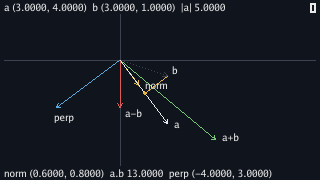
Press Space before touching a key and the program prints the interlude:
$ go run ./cmd/motion -lab arrows
a (3.0000, 4.0000)  b (3.0000, 1.0000)  |a| 5.0000  |b| 3.1623
a+b (6.0000, 5.0000)  a-b (0.0000, 3.0000)  2a (6.0000, 8.0000)  norm a (0.6000, 0.8000)  perp a (-4.0000, 3.0000)
a.b 13.0000  shadow of b on a 2.6000
Every number is the interlude's, printed to four places. The lab stores a and b in pixels because the keys move pixels. It divides by sixteen when it prints because the display explains units.
Scale(1/unit) does that conversion. l.a.Add(d) moves the
vector, one pixel step at a time. The red arrow, a-b, points straight
down because a and b have the same x coordinate. From b's tip, three units down
lands on a's tip.
The gold line from b's tip to a's line draws the dot product as a shadow. The foot
is a.Norm().Scale(a.Dot(b) / al): a's direction times the shadow's
length. In the starting frame that length is 2.6 units from the origin.
arrow uses the same operations to draw an arrowhead. It steps back
along the arrow's normalised direction, then moves sideways along its
perpendicular. No angle is needed.
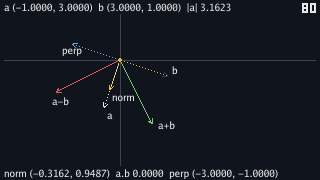
Hold Left for 64 ticks and Up for 16 and a lands on (−1, 3). The bottom line
reads a.b 0.0000. The gold dot has moved back to the origin because b
has no component in a's direction.
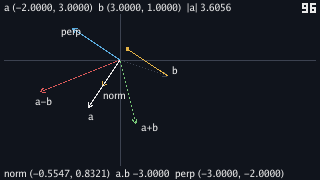
Sixteen ticks more of Left moves a to (−2, 3). The dot product becomes negative because a points more away from b than with it. Press Space at each position:
$ go run ./cmd/motion -lab arrows
a (-1.0000, 3.0000)  b (3.0000, 1.0000)  |a| 3.1623  |b| 3.1623
a+b (2.0000, 4.0000)  a-b (-4.0000, 2.0000)  2a (-2.0000, 6.0000)  norm a (-0.3162, 0.9487)  perp a (-3.0000, -1.0000)
a.b 0.0000  shadow of b on a 0.0000
$ go run ./cmd/motion -lab arrows
a (-2.0000, 3.0000)  b (3.0000, 1.0000)  |a| 3.6056  |b| 3.1623
a+b (1.0000, 4.0000)  a-b (-5.0000, 2.0000)  2a (-4.0000, 6.0000)  norm a (-0.5547, 0.8321)  perp a (-3.0000, -2.0000)
a.b -3.0000  shadow of b on a -0.8321
(−2) × 3 + 3 × 1 = −3, and −3 over a's length of 3.6056 is −0.8321. The foot of the shadow is behind a's tail, so the picture puts the gold dot on the far side of the origin.
The sign is the fast test. A positive dot product means the vectors lean the same way. Zero means they are at right angles. A negative dot product means they lean apart. Games use that sign to ask whether one thing is in front of another without computing an angle.
Delete the three lines of the guard in Norm, so that it reads
l := a.Len() and then return Vec2{a.X / l, a.Y / l},
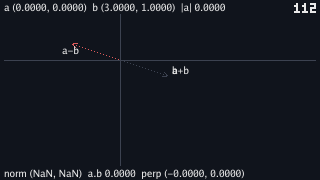
and run the lab. Nothing looks different until a has no length: hold Left for 48
ticks and Up for 64, which brings a's tip back to the origin, and press Space.
$ go run ./cmd/motion -lab arrows
a (0.0000, 0.0000)  b (3.0000, 1.0000)  |a| 0.0000  |b| 3.1623
a+b (3.0000, 1.0000)  a-b (-3.0000, -1.0000)  2a (0.0000, 0.0000)  norm a (NaN, NaN)  perp a (-0.0000, 0.0000)
NaN means "not a number". A float gets it after zero is divided by
zero. Go doesn't panic on a float division by zero; it returns NaN or
an infinity and carries on.
The gold arrow vanished because Ebitengine's StrokeLine received
NaN coordinates and drew nothing. In a game, this bug can turn a
stopped velocity into a NaN heading. The next movement then becomes
NaN too.
Put the guard back in Norm. The package owns the rule because every
caller needs it. The -0.0000 on the same line is a float's negative
zero. It compares equal to zero and is harmless. NaN compares equal to
nothing, including itself.
Getting vector angles
Add two conversions between vectors and angles. A vector's angle is the value
atan2 reads from its tip. An angle's vector is the point on the unit
circle for that angle.
// internal/vec/vec2.go — extend
// Angle is the direction the vector points in, in radians, as AngleOf
// reads it off the tip.
func (a Vec2) Angle() float64 {
	return AngleOf(a.X, a.Y)
}

// FromAngle is the unit vector at angle a: OnCircle, as a Vec2.
func FromAngle(a float64) Vec2 {
	x, y := OnCircle(a)
	return Vec2{x, y}
}
// cmd/motion/arrows.go — extend
import (
"fmt"
"image/color"
"math"
"github.com/hajimehoshi/ebiten/v2"
"github.com/hajimehoshi/ebiten/v2/vector"
"gez/internal/vec"
)
// step moves a's tip a pixel a tick under the arrow keys; b never moves.
// Space prints the pair in units and what the operations make of it.
func (l *arrowsLab) step(k keys) {
var d vec.Vec2
if k.left {
d.X--
}
if k.right {
d.X++
}
if k.up {
d.Y--
}
if k.down {
d.Y++
}
l.a = l.a.Add(d)
if k.space {
a, b := l.a.Scale(1/unit), l.b.Scale(1/unit)
fmt.Printf("a %v b %v |a| %.4f |b| %.4f\n", a, b, a.Len(), b.Len())
fmt.Printf("a+b %v a-b %v 2a %v norm a %v perp a %v\n", a.Add(b), a.Sub(b), a.Scale(2), a.Norm(), a.Perp())
if a.Len() == 0 {
fmt.Printf("a.b %.4f no shadow and no angle: a has no length\n", a.Dot(b))
return
}
fmt.Printf("a.b %.4f shadow of b on a %.4f\n", a.Dot(b), a.Dot(b)/a.Len())
cos := a.Dot(b) / (a.Len() * b.Len())
fmt.Printf("angle of a %.4f deg angle of b %.4f deg angle between %.4f deg\n",
vec.Degrees(a.Angle()), vec.Degrees(b.Angle()), vec.Degrees(math.Acos(cos)))
}
}go vet ./...
go run ./cmd/motion -lab arrows$ go run ./cmd/motion -lab arrows
a (3.0000, 4.0000) b (3.0000, 1.0000) |a| 5.0000 |b| 3.1623
a+b (6.0000, 5.0000) a-b (0.0000, 3.0000) 2a (6.0000, 8.0000) norm a (0.6000, 0.8000) perp a (-4.0000, 3.0000)
a.b 13.0000 shadow of b on a 2.6000
angle of a 53.1301 deg angle of b 18.4349 deg angle between 34.6952 deg
Press Space before any key and the fourth line is new. The angle of a is
atan2(4, 3), 53.1301 degrees. The angle of b is
atan2(1, 3), 18.4349 degrees. The difference is 34.6952 degrees, the
same angle the dot product found through cosine.
The dot product route never names an angle until Acos. It multiplies
four coordinates, adds two products and divides by two lengths. Use that route
when code only needs the sign or size of the overlap. Use atan2 when
the player or the debug line needs an angle to read.
FromAngle returns OnCircle as a vector. It doesn't print
here, but it gives game code a direction from a heading.
Reading vector expressions
Vec2 doesn't know whether it holds a place or a direction. The code that
uses the value gives it meaning. pos.Add(vel) reads as a position moved
by one velocity step. target.Sub(pos) reads as the direction from here to
there.
target.Sub(pos).Norm() keeps that direction and removes the distance.
Scaling it by a speed makes a step toward the target. Read each expression by asking
what each value means before the operation and what the returned value means after it.
Value receivers keep those expressions safe. a.Sub(b).Norm().Scale(speed)
makes temporary vectors and keeps the last one. It does not change a or
b. A paddle method uses a pointer receiver when it is meant to move the
paddle. A vector method doesn't, because a vector is a number.
Checkpoint
- Add, subtract, scale, measure, normalise and turn (3, 4) by hand, and say what each answer is a vector of.
- Compute (3, 4) · (3, 1) and read three things off the 13: the cosine of the angle between, the length of the shadow, and the sign that says the two lean the same way.
- Explain why every
Vec2method has a value receiver, and whata.Sub(b).Norm().Scale(s)would do toaif it did not. - Draw an arrowhead on a line of any length in any direction with
NormandPerpand no angle. - Take a display reading
NaNback to a division of zero by zero inNorm, and say why the guard lives in the package and not in its callers. - Get the angle between two vectors two ways, and say which way a game prefers and why.
Exercise 1 — move b too. Give b the W, S and the A and D keys, so that both arrows move, and watch the dot product's sign as they swing past each other.
Two more booleans in keys and readKeys for A and D
(W and S are already read), and in step a second displacement
added to l.b. The bottom line's a.b crosses zero at
the moment the gold dot passes through the origin, whichever arrow is
moving, because the dot product is symmetric: a.Dot(b) and
b.Dot(a) are the same sum.
Exercise 2 — a's shadow on b. Draw the other shadow, a's foot on b's line, and print its length. Is it 2.6 as well?
o.Add(b.Norm().Scale(a.Dot(b) / b.Len())), and the length is
13 / 3.1623 = 4.1110, not 2.6: the dot product is one number, but a
shadow's length depends on which line it falls on. Both shadows share the
cosine, 0.8222; a's shadow is |a| times it and b's is |b| times it.
Exercise 3 — a heading and a thrust. Replace the
arrow keys' pixel moves with a heading: Left and Right turn an angle a degree a
tick, Up adds vec.FromAngle(heading).Scale(0.5) to a every tick it
is held. Watch a grow along its heading.
A heading float64 field, wrapped as chapter 11's lab wraps its
angle, and l.a = l.a.Add(vec.FromAngle(l.heading).Scale(0.5))
under Up. The tip moves half a pixel a tick in the heading's direction, and
turning the heading while holding Up curves the path: a is now a position
that accumulates steps, which is what a velocity does to a ship.