Coordinate Transforms
Transforming local points
This chapter adds transforms. A transform takes a point written in a thing's own space, then scales it, rotates it and moves it into the world.
The lab draws a ship from four local points. The nose is (10, 0), the tail corners are (−6, 6) and (−6, −6), and the notch is (−3, 0). Those numbers don't change when the ship moves.
The transform stores the changing numbers: position, rotation and scale. Apply them in this order: scale first, rotate second, translate last. That keeps the scale and rotation anchored to the ship's own centre.
Rotating coordinates
Turning a vector through an angle asks where the axes land. The x-axis lands at the angle's point on the unit circle: (cos θ, sin θ). The y-axis lands a quarter turn further round: (−sin θ, cos θ).
A vector (x, y) is x of the first axis plus y of the second. After the turn, it is x times the turned x-axis plus y times the turned y-axis: (x cos θ − y sin θ, x sin θ + y cos θ). At ninety degrees the cosine is 0 and the sine is 1, so (20, 0) becomes (0, 20). Twenty across becomes twenty down on a screen whose y grows downward.
The transform the page works by hand is position (40, 20), rotation ninety degrees, scale 2. The nose is (10, 0) in the ship's own space. Scaled by 2 along both axes it is (20, 0). Rotated a quarter turn it is (0, 20). Translated by the position it is (40, 40), and that is the nose's place in the world. The tail corner (−6, 6) goes the same way: scaled, (−12, 12); rotated, (−12 × 0 − 12 × 1, −12 × 1 + 12 × 0) = (−12, −12); translated, (28, 8). The screen is one more translation, by where the world's origin sits on it, the middle of the picture, (160, 90): the nose is drawn at (200, 130) and the tail corner at (188, 98).
The same operations in the wrong order put the nose somewhere else. Scale, translate, rotate: (20, 0), then (60, 20), then a quarter turn about the world's origin, (−20, 60). The ship's nose ends up forty units left of the ship's position because the rotation ran after the point had moved away from the origin.
// internal/vec/transform.go — create
package vec

import "math"

// Rotate turns v through the angle a about the origin: the same length,
// a further round. The unit x-axis lands on (cos a, sin a) and the unit
// y-axis on that point's perpendicular, (−sin a, cos a), so a vector that
// is x of the one and y of the other lands on x times the first plus y
// times the second.
func (v Vec2) Rotate(a float64) Vec2 {
	c, s := math.Cos(a), math.Sin(a)
	return Vec2{v.X*c - v.Y*s, v.X*s + v.Y*c}
}

// Transform places a thing described in its own space into the world. The
// thing's own origin lands at Pos; its axes are turned through Rot; its
// coordinates are stretched by Scale first, along its own axes. Apply does
// the three in that order, scale, rotate, translate, which is the one order
// that keeps the scale and the rotation anchored to the thing's own origin.
type Transform struct {
	Pos   Vec2    // where the thing's own origin lands in the world
	Rot   float64 // radians, about that origin
	Scale Vec2    // stretch along the thing's own axes, before the rotation
}

// Apply takes a point in the thing's own space to the world: scaled, then
// rotated, then moved.
func (t Transform) Apply(local Vec2) Vec2 {
	scaled := Vec2{local.X * t.Scale.X, local.Y * t.Scale.Y}
	return scaled.Rotate(t.Rot).Add(t.Pos)
}

// Axes reports where the thing's own x-axis, y-axis and origin land in
// the world: three vectors, six numbers, and they are everything the
// transform does, since any local point is x of the first axis plus y of
// the second, from the origin.
func (t Transform) Axes() (ex, ey, o Vec2) {
	o = t.Apply(Vec2{})
	ex = t.Apply(Vec2{X: 1}).Sub(o)
	ey = t.Apply(Vec2{Y: 1}).Sub(o)
	return ex, ey, o
}
go vet ./...
Rotate uses the interlude's formula. It computes cosine and sine once
and uses both twice. Apply reads in the order the transform happens:
scale, rotate, add the position.
Scale is a vector, not one number, because a thing can stretch along its own length
without stretching across it. That stretch must happen before rotation so it uses
the thing's own axes. Axes reports where the origin and the two unit
axes land in the world.
Nothing here uses a pointer receiver. A transform is a value like a vector. Applying it returns a point and changes nothing.
Drawing the ship transform
Extend cmd/motion with a ship lab. The lab draws a twenty-pixel grid,
puts the world's origin in the middle of the picture and sends every hull point
through the transform before Ebitengine draws the lines.
The keys change only the transform. Left and Right turn two degrees a tick. Up and Down move one pixel a tick along the ship's nose. W and S grow and shrink the scale by one thirty-second a tick. R resets the ship, and Space prints the transform.
// cmd/motion/ship.go — create
package main

import (
	"fmt"

	"github.com/hajimehoshi/ebiten/v2"
	"github.com/hajimehoshi/ebiten/v2/vector"

	"gez/internal/vec"
)

// The ship lab draws a ship described in its own space, placed in the
// world by a Transform the keys drive: Left and Right turn it, Up and Down
// move it along its nose, W and S scale it, R puts it back. The world's
// origin is the middle of the picture.
const (
	shipTurn  = 2.0      // degrees a tick
	shipSpeed = 1.0      // pixels a tick along the nose
	shipGrow  = 1.0 / 32 // scale a tick
	gridStep  = 20       // the world's grid, in pixels
)

// worldOrigin is where the world's (0, 0) sits on the screen.
var worldOrigin = vec.Vec2{X: 160, Y: 90}

// shipHull is the ship in its own space: the nose on the positive x-axis,
// the tail six back and six either side, a notch between.
var shipHull = []vec.Vec2{{X: 10, Y: 0}, {X: -6, Y: 6}, {X: -3, Y: 0}, {X: -6, Y: -6}}

// shipStart is where every run begins: the world's origin, nose to the
// right, unscaled.
var shipStart = vec.Transform{Scale: vec.Vec2{X: 1, Y: 1}}

// shipLab keeps one Transform. Where every corner of the hull is follows
// from it and the hull, and is never stored.
type shipLab struct {
	tr vec.Transform
}

func newShipLab() *shipLab {
	return &shipLab{tr: shipStart}
}

// toScreen takes a world point to the screen: the world's origin is the
// middle of the picture, so the screen is the world moved by that much.
func toScreen(w vec.Vec2) vec.Vec2 {
	return w.Add(worldOrigin)
}

// world takes a point in the ship's own space to the world.
func (l *shipLab) world(local vec.Vec2) vec.Vec2 {
	return l.tr.Apply(local)
}

// step drives the transform. Nothing here touches a corner of the ship:
// the keys change the three fields, and the picture follows. Space prints
// the transform and the nose's way through it.
func (l *shipLab) step(k keys) {
	if k.r {
		l.tr = shipStart
	}
	if k.left {
		l.tr.Rot = vec.Wrap(l.tr.Rot - vec.Radians(shipTurn))
	}
	if k.right {
		l.tr.Rot = vec.Wrap(l.tr.Rot + vec.Radians(shipTurn))
	}
	if k.up {
		l.tr.Pos = l.tr.Pos.Add(vec.FromAngle(l.tr.Rot).Scale(shipSpeed))
	}
	if k.down {
		l.tr.Pos = l.tr.Pos.Sub(vec.FromAngle(l.tr.Rot).Scale(shipSpeed))
	}
	if k.w {
		l.tr.Scale = l.tr.Scale.Add(vec.Vec2{X: shipGrow, Y: shipGrow})
	}
	if k.s {
		l.tr.Scale = l.tr.Scale.Sub(vec.Vec2{X: shipGrow, Y: shipGrow})
	}
	if k.space {
		nose := shipHull[0]
		scaled := vec.Vec2{X: nose.X * l.tr.Scale.X, Y: nose.Y * l.tr.Scale.Y}
		fmt.Printf("pos %v  rot %.4f rad = %.4f deg  scale %v\n", l.tr.Pos, l.tr.Rot, vec.Degrees(l.tr.Rot), l.tr.Scale)
		fmt.Printf("nose local %v  scaled %v  rotated %v  world %v  screen %v\n",
			nose, scaled, scaled.Rotate(l.tr.Rot), l.world(nose), toScreen(l.world(nose)))
		ex, ey, o := l.tr.Axes()
		fmt.Printf("axes: x lands on %v  y on %v  origin on %v\n", ex, ey, o)
	}
}

func (l *shipLab) draw(screen *ebiten.Image, h *hud) {
	for x := float32(worldOrigin.X); x < screenW; x += gridStep {
		vector.StrokeLine(screen, x, 14, x, screenH-14, 1, dimColor, false)
		vector.StrokeLine(screen, 2*float32(worldOrigin.X)-x, 14, 2*float32(worldOrigin.X)-x, screenH-14, 1, dimColor, false)
	}
	for y := float32(worldOrigin.Y); y < screenH-14; y += gridStep {
		vector.StrokeLine(screen, 0, y, screenW, y, 1, dimColor, false)
		vector.StrokeLine(screen, 0, 2*float32(worldOrigin.Y)-y, screenW, 2*float32(worldOrigin.Y)-y, 1, dimColor, false)
	}
	// The hull, one edge at a time, each corner taken local -> world -> screen.
	for i := range shipHull {
		a := toScreen(l.world(shipHull[i]))
		b := toScreen(l.world(shipHull[(i+1)%len(shipHull)]))
		vector.StrokeLine(screen, float32(a.X), float32(a.Y), float32(b.X), float32(b.Y), 1, lineColor, false)
	}
	// The ship's own axes, as they land in the world.
	ex, ey, o := l.tr.Axes()
	arrow(screen, h, toScreen(o), ex.Scale(16), xColor, "x")
	arrow(screen, h, toScreen(o), ey.Scale(16), yColor, "y")
}

func (l *shipLab) lines() (top, bottom string) {
	nose := l.world(shipHull[0])
	return fmt.Sprintf("pos %v  rot %.4f deg  scale %.4f", l.tr.Pos, vec.Degrees(l.tr.Rot), l.tr.Scale.X),
		fmt.Sprintf("nose world %v  screen %v", nose, toScreen(nose))
}
// cmd/motion/main.go — extend
// newLab builds the lab named: the one place a name becomes a lab.
func newLab(name string) (lab, error) {
switch name {
case "circle":
return newCircleLab(), nil
case "arrows":
return newArrowsLab(), nil
case "ship":
return newShipLab(), nil
}
return nil, fmt.Errorf("no lab called %q", name)
}go vet ./...
go run ./cmd/motion -lab ship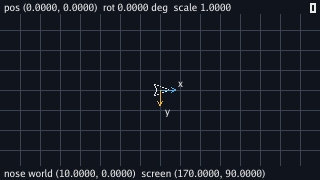
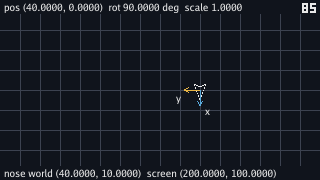
Hold Up for forty ticks and the ship moves forty units along its nose. The nose starts on the world's x-axis, so the position becomes (40, 0). Hold Right for forty-five ticks and the rotation reaches ninety degrees. The ship now points down the screen.
Hold Up for twenty more ticks and the ship moves down to (40, 20). Hold W for thirty-two ticks and the scale reaches 2. Press Space:
$ go run ./cmd/motion -lab ship
pos (40.0000, 20.0000)  rot 1.5708 rad = 90.0000 deg  scale (2.0000, 2.0000)
nose local (10.0000, 0.0000)  scaled (20.0000, 0.0000)  rotated (-0.0000, 20.0000)  world (40.0000, 40.0000)  screen (200.0000, 130.0000)
axes: x lands on (0.0000, 2.0000)  y on (-2.0000, -0.0000)  origin on (40.0000, 20.0000)
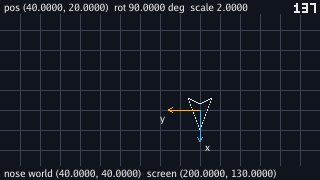
The second line is the interlude printed by the program: (10, 0) scaled to (20, 0), rotated to (0, 20), translated to (40, 40), then drawn at (200, 130). The third line says the same transform through its axes.
One unit along the ship's x lands two units down the world. One unit along its y lands two units left. Its origin lands at (40, 20). The nose has local x equal to 10, so ten of that x-axis plus the origin puts the nose at (40, 40).
The -0.0000 in two places is a float's negative zero, and it says
something true about the run: forty-five additions of two degrees' worth of
radians land a rounding error past a quarter turn, and the cosine of a hair past
ninety degrees is a hair below zero. It prints with a sign and compares equal to
zero, and every number derived from it rounds to what the hand got.
Up moves the ship along its nose with
vec.FromAngle(l.tr.Rot).Scale(shipSpeed). That makes a unit vector
from the heading, scales it to one pixel and adds it to the position.
No corner of the hull is ever moved. The four points in shipHull stay
the same, and draw sends each one through world and
toScreen every frame. The grid draws outward from the origin in both
directions so one line always passes through the world's (0, 0).
Ebitengine's GeoM is the same kind of recipe for images. Its scale,
rotate and translate methods add steps to the transform, and
DrawImage puts every pixel through those steps.
The lab draws lines through Transform instead of an image through
GeoM so the arithmetic stays visible. A sprite of the ship would use
GeoM.Scale, GeoM.Rotate and
GeoM.Translate in that order.
Trying the wrong order
Add a flag that can run the transform steps in other orders. The correct order is
srt: scale, rotate, translate. The flag lets the failure run the wrong
order on purpose.
// internal/vec/transform.go — extend
import (
	"fmt"
	"math"
)

// ApplyOrder does the same three operations in the order the word names,
// read left to right as the order they are done in: "srt" is Apply. The
// other five orders are mistakes, kept so that they can be run. A word
// that is not three of s, r and t is refused.
func (t Transform) ApplyOrder(local Vec2, order string) (Vec2, error) {
	if len(order) != 3 {
		return Vec2{}, fmt.Errorf("order %q: want three of s, r and t", order)
	}
	v := local
	for _, op := range order {
		switch op {
		case 's':
			v = Vec2{v.X * t.Scale.X, v.Y * t.Scale.Y}
		case 'r':
			v = v.Rotate(t.Rot)
		case 't':
			v = v.Add(t.Pos)
		default:
			return Vec2{}, fmt.Errorf("order %q: want three of s, r and t", order)
		}
	}
	return v, nil
}
// cmd/motion/ship.go — extend
import (
"flag"
"fmt"
"log"
"github.com/hajimehoshi/ebiten/v2"
"github.com/hajimehoshi/ebiten/v2/vector"
"gez/internal/vec"
)
// world takes a point in the ship's own space to the world, in the order
// the flag names; the default is Apply's.
func (l *shipLab) world(local vec.Vec2) vec.Vec2 {
p, err := l.tr.ApplyOrder(local, *order)
if err != nil {
log.Fatal(err)
}
return p
}
var order = flag.String("order", "srt", "the order the ship lab applies scale, rotate and translate in: srt is the right one, and the other five are mistakes, kept so they can be seen")go vet ./...
go run ./cmd/motion -lab ship
go run ./cmd/motion -lab ship -order rst
With the default flag, the lab behaves as before. -order rst also
looks the same while both scale values stay equal. Scaling by the same amount on
both axes and then rotating gives the same result as rotating and then scaling.
The orders that translate before the end change the result. The blue and gold axes
still come from Axes, which uses the correct order. Under a wrong
order, the axes show where the ship should be while the hull appears somewhere
else.
Run the lab with -order str, scale, translate, rotate, and make the
same moves as before: Up forty, Right forty-five, Up twenty, W thirty-two, Space.
$ go run ./cmd/motion -lab ship -order str
pos (40.0000, 20.0000)  rot 1.5708 rad = 90.0000 deg  scale (2.0000, 2.0000)
nose local (10.0000, 0.0000)  scaled (20.0000, 0.0000)  rotated (-0.0000, 20.0000)  world (-20.0000, 60.0000)  screen (140.0000, 150.0000)
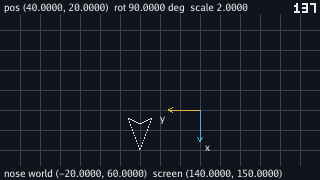
-order str after the same keys: the transform's fields are the interlude's, the axes are where they should be, and the hull is sixty units away from them.The first line is the same as before, but the second line is not. The nose is at world (−20, 60), and the picture shows the hull far from the axes.
The translation happened before the rotation. The nose was already at (60, 20) when rotation ran, and a rotation turns around the origin of its current space. A quarter turn of (60, 20) around the world's origin gives (−20, 60).
Put the order back to srt. The ship must scale and rotate while its
own centre is still the origin. Then translation can carry the result into the
world.
Choosing the anchor
Scale and rotation both have an anchor point. For the ship, that anchor is the ship's own centre. In local space that centre is the origin, because the hull was written around it.
Scale and rotation therefore happen first. Translation happens last because it moves the anchor into the world. If rotation happens after translation, the ship rotates around the world's origin instead of its own.
More transforms can stack. A turret can have its own local space, then a transform that places it on the ship, then the ship's transform into the world. Each transform still uses scale, rotate, translate in its own space. The screen is one more space: world coordinates plus the world's origin on the screen.
Checkpoint
- Rotate (20, 0) through ninety degrees by hand from where the two axes land, and say why the y-axis's landing place needs no second cosine.
- Take the nose (10, 0) and the tail corner (−6, 6) through position (40, 20), rotation 90° and scale 2, step by step, to (40, 40) and (28, 8), and on to the screen.
- Name the three spaces a ship's corner has coordinates in, and the operation between each pair.
- Drive a
Transformfrom the keys without ever touching a corner of the hull, and move a thing along its own heading withFromAngle. - Read (−20, 60) off a run under
-order strand say which anchor moved before which operation. - Say when rotate-then-scale is the same as scale-then-rotate, and when it is not.
Exercise 1 — a longer ship. Make W and S change only
Scale.X, so the ship stretches along its own nose, and run
-order rst beside the default.
l.tr.Scale.X += shipGrow under W and the same with a minus under
S. Under the default the ship gets longer along its nose whatever way it faces.
Under rst the stretch happens after the turn, along the world's x,
so a ship pointing down the screen gets wider instead of longer: the scale was
anchored to the right point but applied along the wrong axes, which is the
second half of why scale comes first.
Exercise 2 — a turret. Draw a second, smaller hull placed on the ship at local (−3, 0), turned by its own angle that Q and E change, and moving with the ship.
A second vec.Transform with Pos: vec.Vec2{X: -3},
its own Rot under two new keys, and Scale of one.
Each turret corner goes l.tr.Apply(turret.Apply(p)): local to
turret, turret to ship, ship to world, and then toScreen. Move
and turn the ship and the turret rides it; turn the turret and only the
turret moves, about its own spot on the hull, because its own transform is
applied first.
Exercise 3 — a camera. Make worldOrigin a
field the keys move with I, J, K and L, and watch the whole world slide under a
ship that stays put on the screen.
Replace the package variable with a field on the lab and pass it to
toScreen. Moving it moves every drawn thing by the same amount,
grid and ship alike, because it is the last translation every point goes
through and nothing in the world changed. Set it to
worldOrigin.Sub(l.tr.Pos) every tick and the ship is pinned to
the middle of the picture while the grid slides past it.